The layoff list: how to get picked off the referral spreadsheet after a redundancy
Eli Gunduz··11 min read
Share
Picked off the sheet. Rows get picked by what a company needs that fortnight. Write yours in the words they search.
So if your first week on the sheet goes quiet, it says very little about you. Most of the time, the row didn't use the words the recruiter was looking for.
In one of our coaching sessions, I played a client a product demo from one of the big applicant tracking systems, the software recruiters read applications in. One role on screen, 286 applications. We looked through the demo until we found an application flagged as referred. The same screen listed that candidate's other applications to the company, and which had been turned down. I said it to the client plainly:
Referrals are cheat codes to get to the interview.
After a redundancy, the sheet is where a lot of those referrals start. This is how I describe it when people ask:
Once a company makes their people redundant, there is usually a spreadsheet that goes around with their names, emails and what they are looking for, and their managers or people start referring them.
It stays live for about two weeks, give or take. That's the market clock from our redundancy guide, and this post is the long version of the one row you get on it.
Who reads a layoff list, and how a row gets picked
Three kinds of people open it: recruiters, recruitment managers and, depending on the company, hiring managers. Former managers and colleagues pass it around and start referring people straight from it.
None of them are reading it to be kind. They have roles open, and the sheet is a list of people who are free to start. So they use it like a search. Which row gets picked comes down to demand: what that company needs that fortnight.
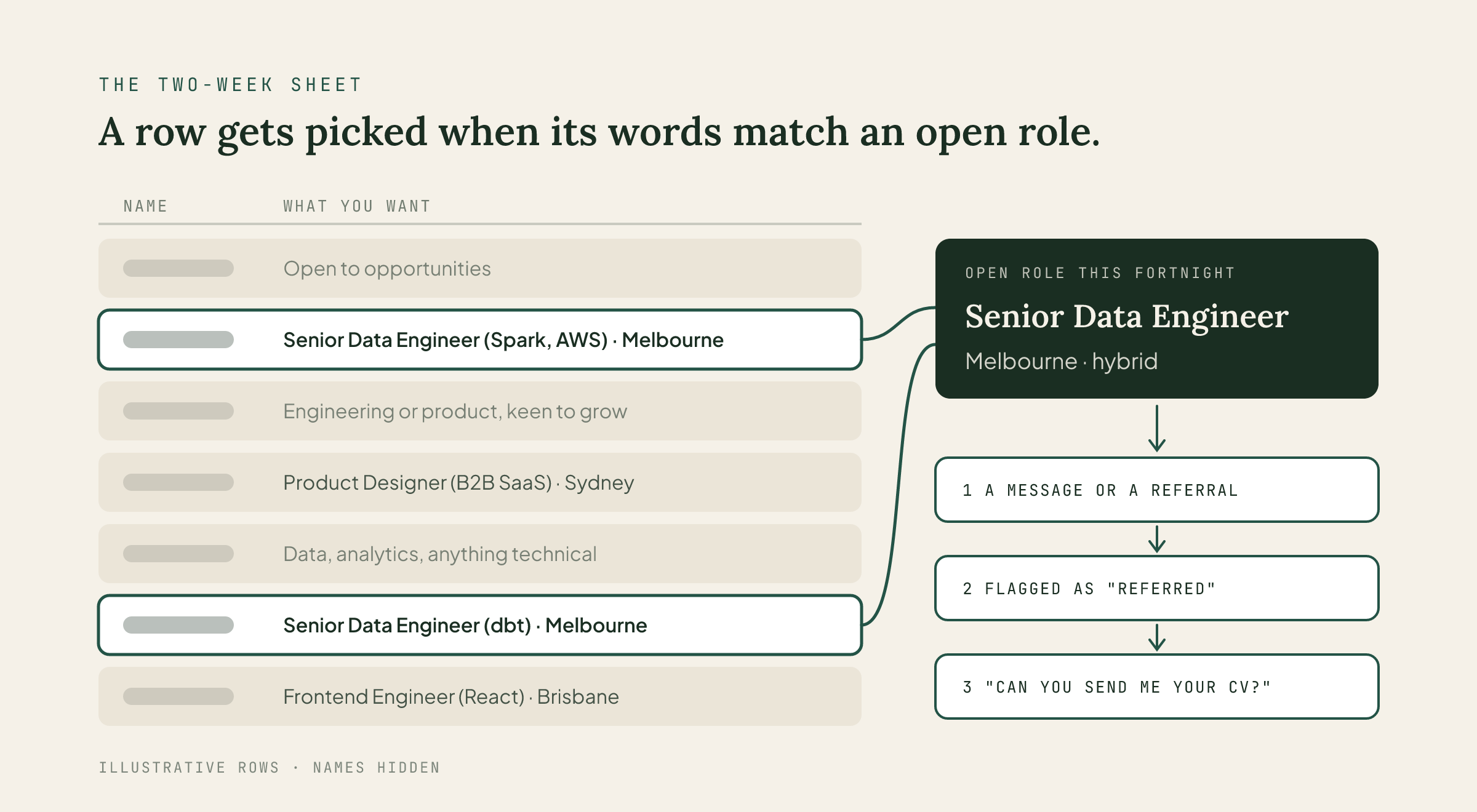
Say a recruiter has an open senior data engineering role in Melbourne. They're looking for senior data engineers in Melbourne. The row that says those words gets the message. The row that says "open to opportunities" isn't in the running, however good the person behind it is.
In the guide I called this the two-week sheet, and the sum still holds:
The two-week sheet = your row × what a company needs that fortnight.
The second half is out of your hands. The first half you can fix tonight.
Your row gets read before your CV does.
What a pick turns into
A pick sets off a short chain, and each link has a job:
The message. Your row gets you a message or a referral.
The referral. In the system we looked at, a referred application was flagged as referred for the recruiter. So ask the person who messaged you whether they can refer you.
The CV, inside a day. Both routes end with "Can you send me your CV?" Have it ready so you can send it the same day.
The application, last. Apply after the referral, or through it. An application that goes in before anyone refers you can usually stop an employee putting you forward for that role.
What's on a layoff list, and the columns worth adding
The sheet usually carries three things: your name, your email and what you're looking for. That's enough to be found. A few more columns save the reader a message, and every message saved makes your row easier to act on.
Column
What to write
Why
Name
First and last name
So a former manager can vouch for the right person
Email
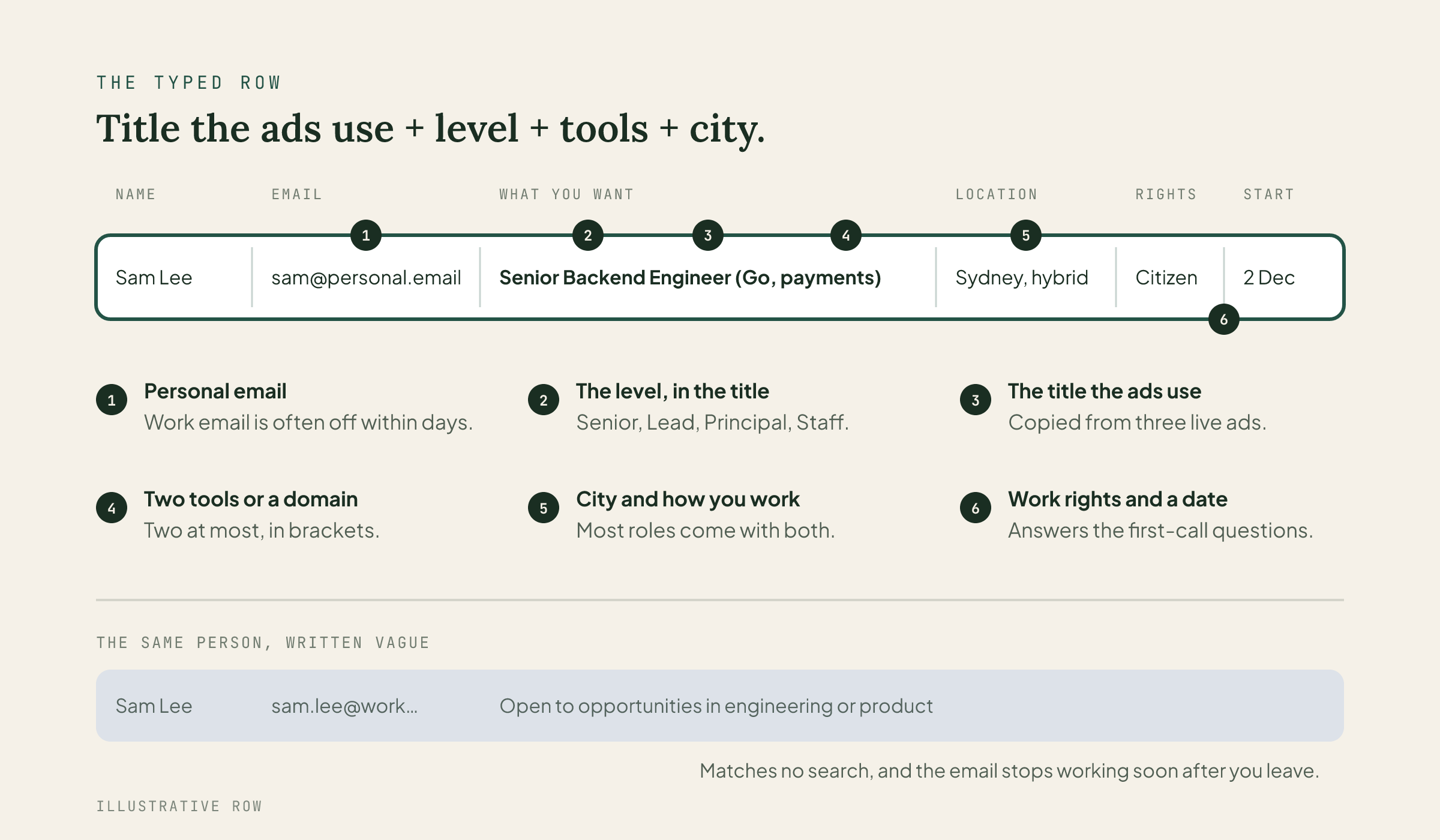
Your personal email
Your work email usually stops working within days of leaving, and any referral sent to it is lost
What you want
The job title the ads use, your level, one or two tools or a domain
This is the cell that gets searched. The next section is all about it
Location
City and how you work: "Sydney, hybrid"
Most open roles have a city and a work pattern attached
Work rights
Citizen, PR, or "482, needs sponsorship"
A recruiter has to know before the first call, so say it first
Available from
A date
Tells a recruiter whether you fit a role that has to start soon
LinkedIn
Your profile link
The next thing they'll open after your row
Leave three things off: your salary, why your role was chosen and anything about your performance. The sheet goes around, and it reaches people you'll never meet. Write nothing in it you wouldn't want forwarded.
The typed row: how to write the "what you want" cell
Every other column is a fact. This one is a choice, and it's where people lose the fortnight.
Recruiters search for job titles as they're written. They don't translate. If your company called you a "Member of Technical Staff III", a recruiter looking for a senior software engineer will never type that, and your row will never match. Your title on the sheet has to be the one the market uses.
The typed row = title the ads use + level + one or two tools or a domain + city.
Here's what that looks like, in order:
Write the job title the ads use. Open three live ads for the role you want, in your city. Copy the title they share. If your official title was internal, put the market title on the sheet and explain the real one when they call. That conversation is easy.
Put the level in the same cell. "Senior", "Lead", "Principal", "Staff". The ads put the level in the title, so a search for the role carries it too.
Add one or two tools or a domain in brackets. "(Go, payments)" or "(Salesforce, B2B)". Two at most. A list of ten tools reads like no preference at all.
Pick one role family. One. This is the call people push back on, so the next part is about it.
Stop. No adjectives. "Passionate", "results-driven" and "open to opportunities" match no search anyone has ever typed.
A filled-in pair (illustrative):
Vague: Alex K. · work email · Open to opportunities in engineering or product, keen to grow
Typed: Sam Lee · sam.lee@personal email · Senior Backend Engineer (Go, payments) · Sydney, hybrid · Citizen · Available 2 December
One role family, even though it feels like less
When your job has just gone, a wide row feels safer. Engineering or product. Data or analytics. It feels like keeping doors open.
It works the other way. A recruiter with a product manager role is looking for product managers. A row that says "engineering or product" reads as someone who hasn't decided. The row beside it says "Senior Product Manager (payments)", and that's the one that gets the message. A row that names no role gets no message.
If you've done two jobs for real, there's an honest way to carry both. Join the two titles, like "Product Owner / Project Manager". Only do it if your last role proves both. That's still one row a search can find.
To pick the family, count. Search LinkedIn Jobs or SEEK for each title you're weighing, in your city, posted in the last two weeks. The one with more live ads is where the demand is this fortnight. If you'd rather not count by hand, Market Radar in Careersy AI tracks how many jobs are open for your role in your city. It refreshes every fortnight. When the sample is too thin to mean anything, it says so. Either works.
How you know your row works: tonight, cover your name and read the row cold. If a stranger could say which job ad you'd fit in five seconds, it's typed. Then search the row for the exact title from three live ads, and rewrite it until those words are in it. Within five working days, count the messages that mention your exact title. Zero means the title cell is the problem, so match it to the ads word for word.
Your row is a search result, not a bio.
Nobody's started a sheet? Start one
Some rounds don't get a sheet. Smaller companies, a round spread over months, or nobody thinks of it in the first week. Someone has to be the first row. It can be you.
Start the sheet = one form + personal emails + everyone adds themselves.
Here's how, tonight:
Make a form that people fill in. A Google Form or a Microsoft Form with the columns above, writing into a sheet behind it. Everyone types their own row in their own words. If the sheet is open to edit, rows get deleted, overwritten or sorted into a mess by the second day.
Everyone adds their own row. Never add a colleague, even to help. A row holds someone's name, email and work rights. That's their personal information, and only they get to share it.
Put the start date at the top. "Started 18 November 2026." Readers can see how fresh it is, and so can you when it's time to stop relying on it.
Send it to former managers first. They're the ones who start referring people from it. Ask each one to pass it to the recruiters they know.
Share the link directly, one person at a time. A public link to a sheet full of personal emails gets copied by people you'd never pick. On a public post, say "message me for the link."
Somebody has to be the first row.
When the sheet goes cold
After two weeks or so, the messages slow down. The recruiters who were going to read it have read it. That isn't a verdict on you. The sheet did the job it does, for the roles that were open that fortnight.
The cold sheet = the people who read it + your own post.
What to do next:
Follow up with everyone who messaged you from it, even the ones that went nowhere. One line on what you're going for now. They already know who you are, and they may have new roles next month.
Write to the managers who passed it around. Thank them, and give them your typed row as one line they can forward.
Post your own "what's next" update on LinkedIn. Your sheet only reached people inside your old company's circle. A post reaches everyone else. Our guide on being active on LinkedIn covers what to write so it doesn't read like every other post.
Turn on Open to Work for recruiters only. LinkedIn lets you choose who sees it, so recruiters can find you without the green banner.
Build referrals one at a time. Pick target companies, find the person doing the role, and ask. How to get a referral walks through it step by step.
Make your LinkedIn headline match your row while you're there. A recruiter who missed the sheet will search LinkedIn the same way, title first, and should find the same words.
The people who read the sheet are still there when it goes quiet.
If you're the recruiter reading this
The sheet only lasts a fortnight, and the people on it are in the hardest weeks of their job search. If you looked at a row and it wasn't right this time, send a two-line note: "Not this fortnight, saved your details." It costs you ten seconds. It means a lot to someone in their second week without a job.
Where this doesn't work
A role nobody's hiring this fortnight. The sheet runs on demand. If nobody needs your role type right now, a perfect row won't change that. I don't have a neat fix. The slower route still works: target companies, the right people, referrals one at a time.
Contractors and very small companies. Often no sheet at all. Your own post and your own network do the job the sheet would have done.
You found out about the sheet in week three. Add your row anyway, then move straight to the cold-sheet steps.
The short version
What it is: a sheet with names, emails and what each person wants, live for about two weeks.
Who reads it: recruiters, recruitment managers, sometimes hiring managers, picking by what they need.
Your row: personal email, the job title the ads use, your level, one or two tools, your city, your work rights.
One role family: count live ads for each title and pick the one with demand.
No sheet: start one with a form, and let everyone add themselves.
Gone cold: follow up, post, turn on Open to Work for recruiters, build referrals one at a time.
FAQ
What is a layoff list?
A spreadsheet that goes around after a company makes people redundant. It lists each person's name, email and the role they're looking for, and former managers and colleagues refer people from it. From what I've seen, it stays live for about two weeks.
Who reads the layoff spreadsheet?
Recruiters, recruitment managers and sometimes hiring managers, depending on the company. They pick rows based on what their company needs that fortnight.
Should I put my work email on the layoff list?
No. Use your personal email. Your work email usually stops working within days of leaving, and any referral sent to it is lost.
What should I write in the "what you're looking for" column?
The job title the ads use, your level, one or two tools or a domain in brackets, and your city. For example, "Senior Backend Engineer (Go, payments), Sydney, hybrid". Avoid "open to opportunities", which matches no search.
Is it OK to add a colleague to the layoff list?
No. Only add yourself. A row holds someone's name, email and work rights, so it's their information to share. Send them the link instead.
What do I do when the layoff list goes cold?
Follow up with everyone who messaged you from it. Post your own "what's next" update on LinkedIn. Turn on Open to Work for recruiters only. Then build referrals one at a time.
redundancylayoff listreferralstech layoffs australia