Careersy AI
New · Guided Job Hunt

Your job hunt is a hundred tabs and a spreadsheet you stopped updating.

Guided Job Hunt puts every role in one pipeline, reads where your search is stuck, and tells you the next move. The way a recruiter would run it for you. Not "apply to more." The specific thing to fix next.

It’s part of your Careersy account.

The scattered hunt

The chaos is the problem, not your effort.

Fifty roles across a dozen sites. A spreadsheet you update for a week, then don’t. Weeks of silence with no idea whether the problem is the CV, the roles you’re picking, or the interview. So you do the only thing you can see how to do: apply to more, harder, at the thing that isn’t the problem.

The part a spreadsheet can’t do

It tells you where your search is actually stuck.

A job hunt drags when you fix the wrong thing: polishing the CV when the interview is the problem, or grinding interviews when the CV never gets you in the room. From the inside, you can’t tell which. But when you can see the whole board, the bottleneck becomes obvious: Guided Job Hunt reads the shape of your search, names the stage you’re leaking at, and tells you the next thing to do. When that next move is your CV, it hands you straight to CV Canvas to rebuild it, then back to the hunt. Not more effort. The right effort.

One stores what happened. One tells you what to do.

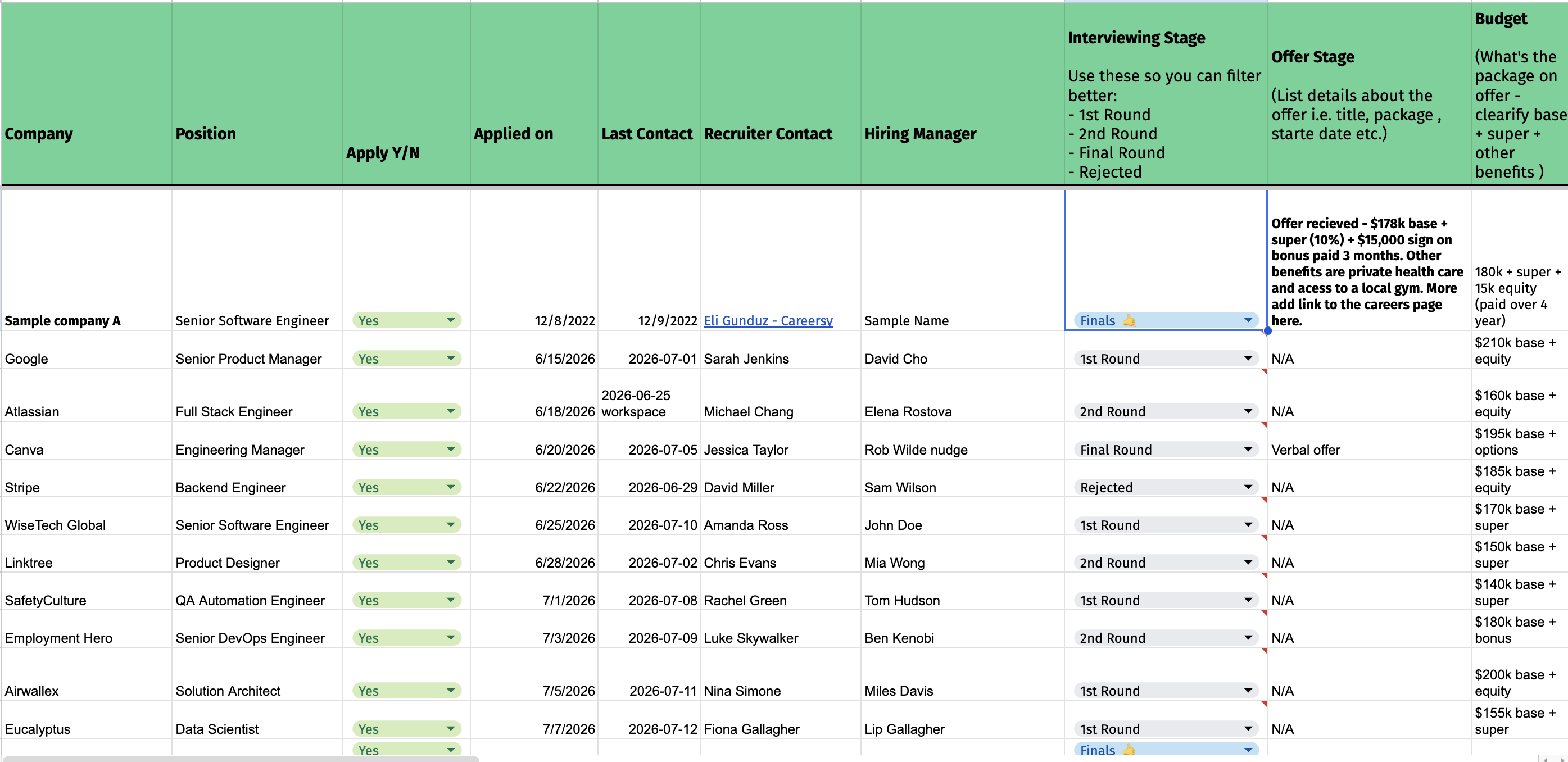
A real job-application tracking spreadsheet: dozens of columns for company, stage, recruiter, and offer, most of them empty

A dead list. It holds what you typed, goes stale in a week, and never once tells you what is going wrong.

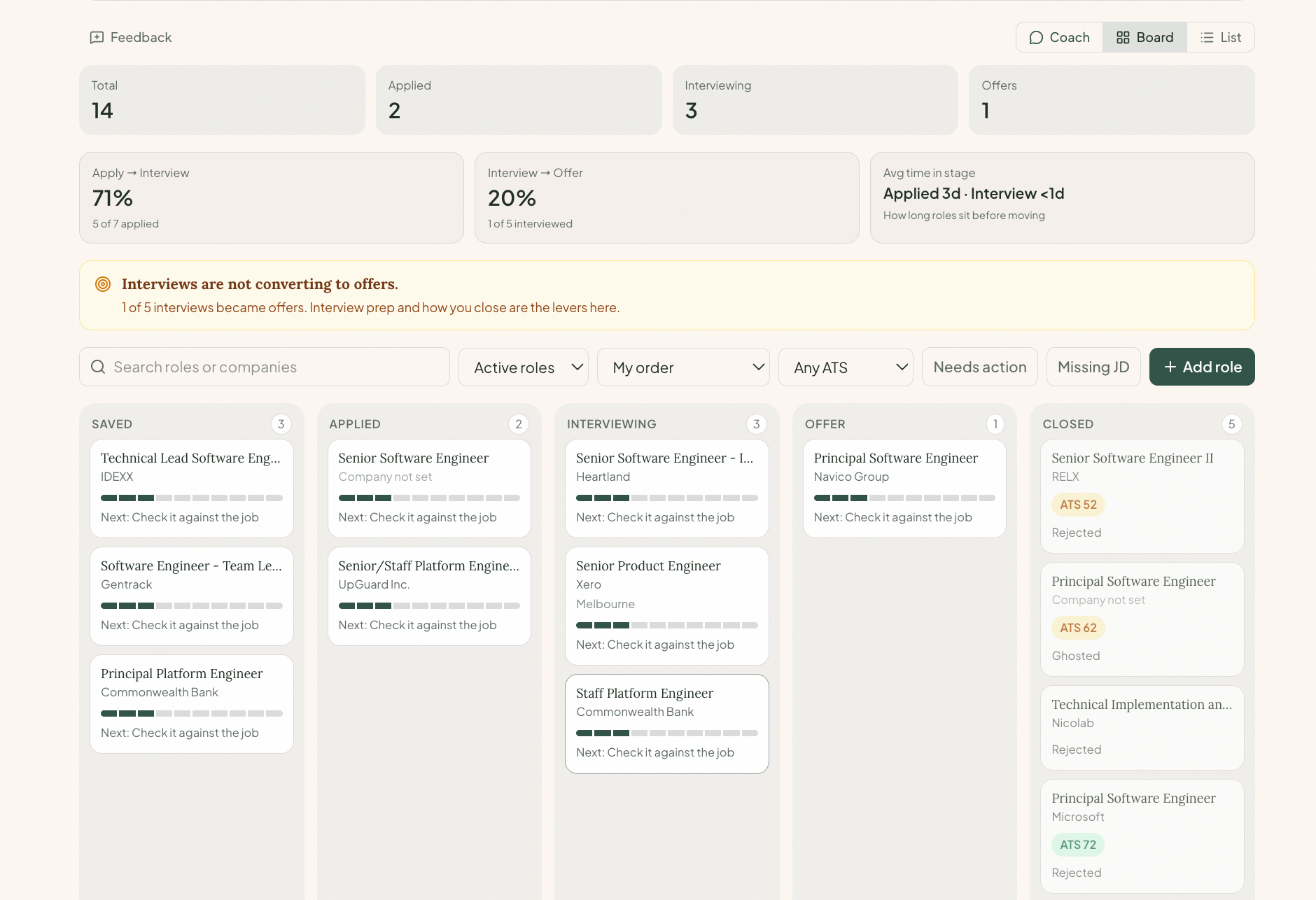
The living pipeline: a conversion funnel across stages with the leaking stage flagged, and a plain-language read of the bottleneck

A living pipeline. It reads the shape of your search and names the stage you’re leaking at, then the fix.

The method

Effort isn't a strategy.

A search without a feedback loop is the same week on repeat. These are the patterns a guided hunt runs on.

STUCKFIXED

Diagnose, then fix

Silence gives you nothing to change. A named blocker gives you everything.

How it works

Gather, read, work, decide.

Gather.

Save roles from inside Careersy, or paste any job link to add one.

Read.

It scores your CV against the role and shows you the exact gap.

Work.

Drag each role from Saved to Offer, the applied date and next action on the card.

Decide.

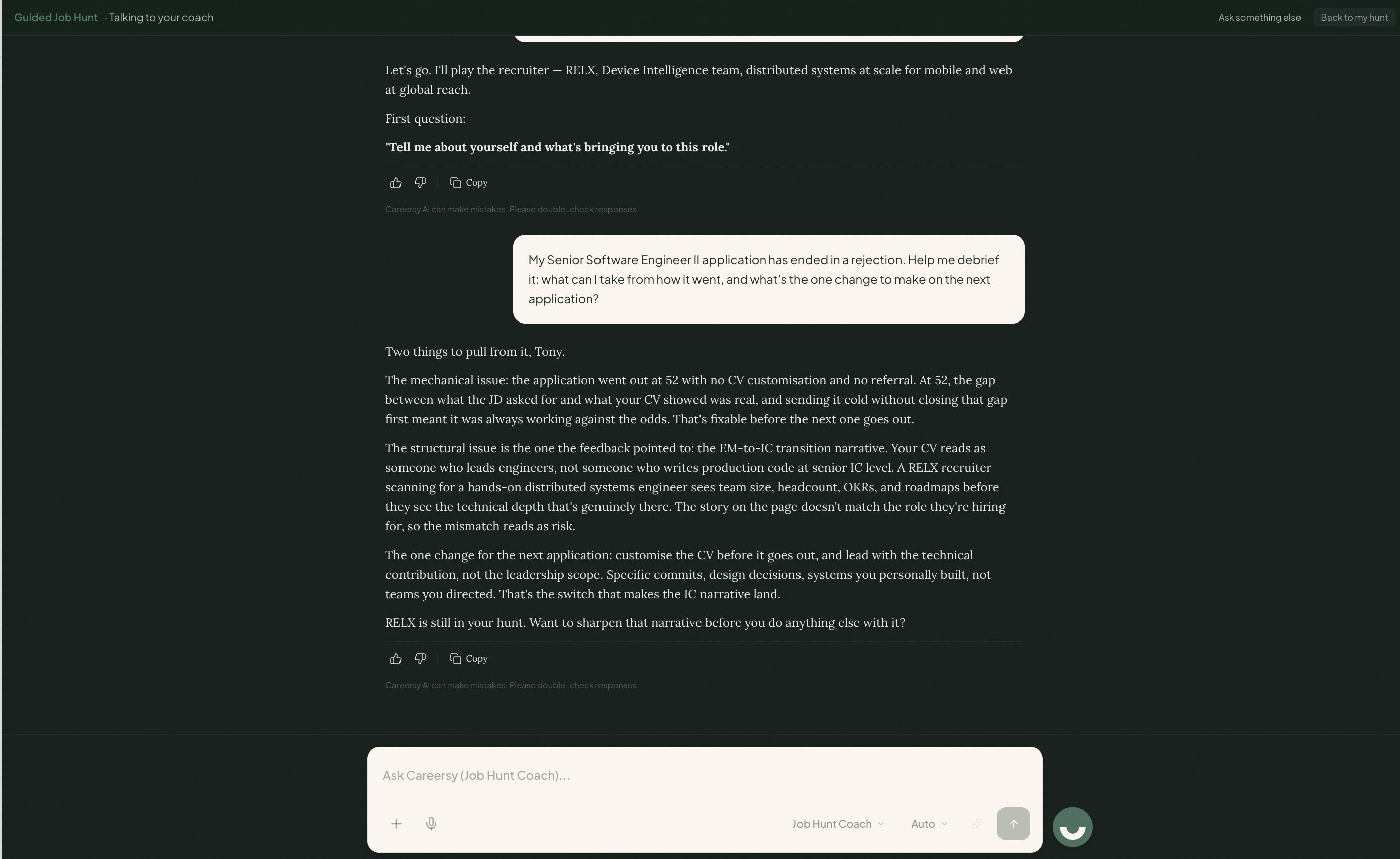
Ask what is next and get an answer grounded in your real pipeline, not a generic tip.

Before the job search

You’ve done a bit of everything. Nothing on the board fits cleanly.

This is where a lot of people get stuck, before the job search even starts. You don’t have fifty roles to track. You have none you feel sure about. Every job looks like a maybe, so you apply to all of them, and that scattered aim is exactly what a recruiter sees.

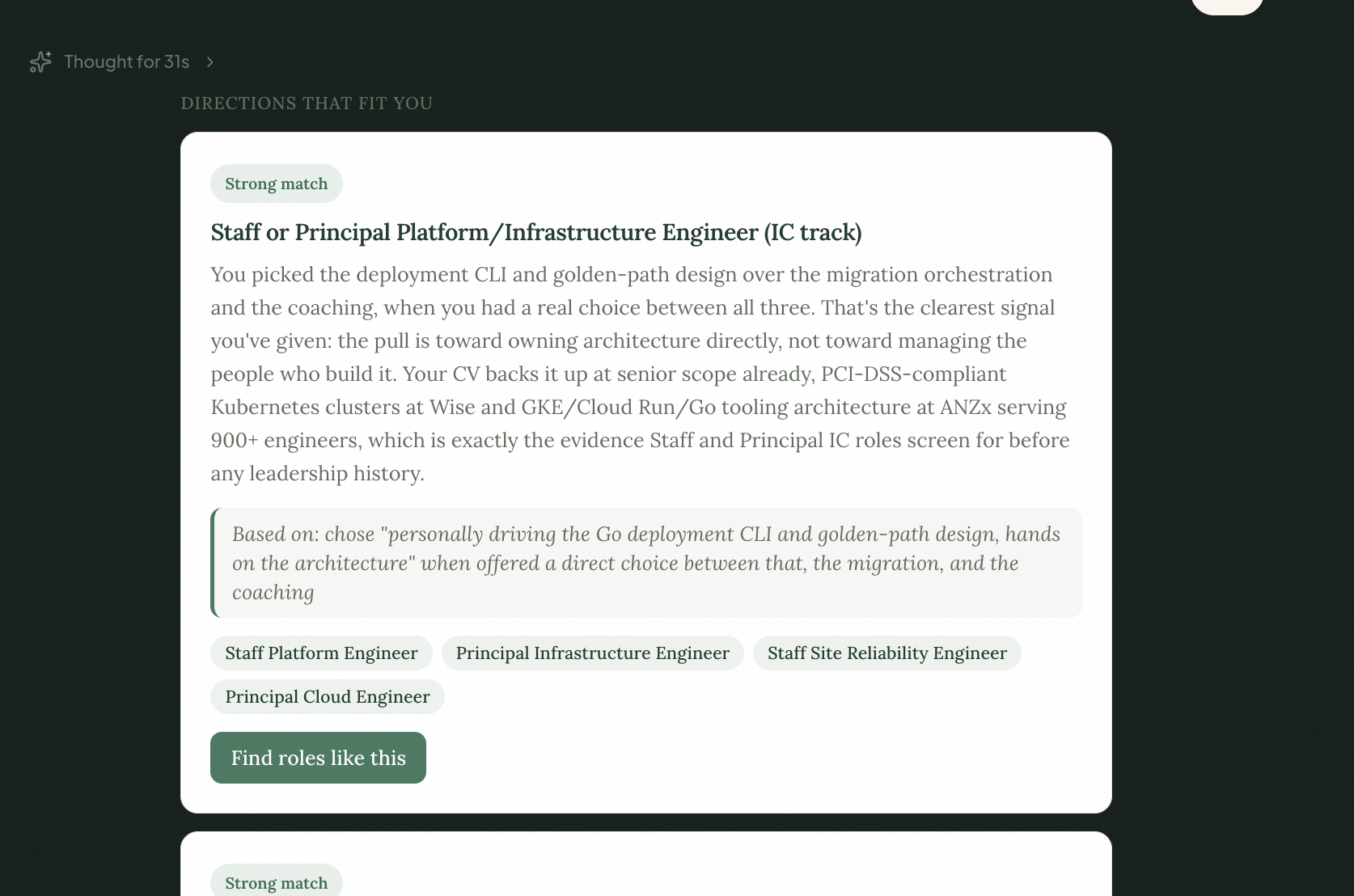
Role Discovery starts one step earlier. Sunny reads your real CV and work history, not a personality quiz, and gives you two or three roles you could actually go after. Each one tells you straight how well you fit: a strong match, or a stretch with the missing piece named. You pick one, and your job search starts with a clear target.

The clearer your fit, the more calls you get. So we tell you straight.

Role Discovery: Sunny reads the CV and hands back grounded role directions, each with an honest fit badge and the reasoning it was based on
One pipeline

From a dead spreadsheet to a board you actually work.

A real search is fifty to a hundred roles over months. Instead of a spreadsheet you stop updating, Guided Job Hunt holds every role in one living pipeline: a board you drag from Saved to Offer, the whole story on each card, run through the stages a recruiter would recognise.

Three views

A board, a list, or a coach conversation.

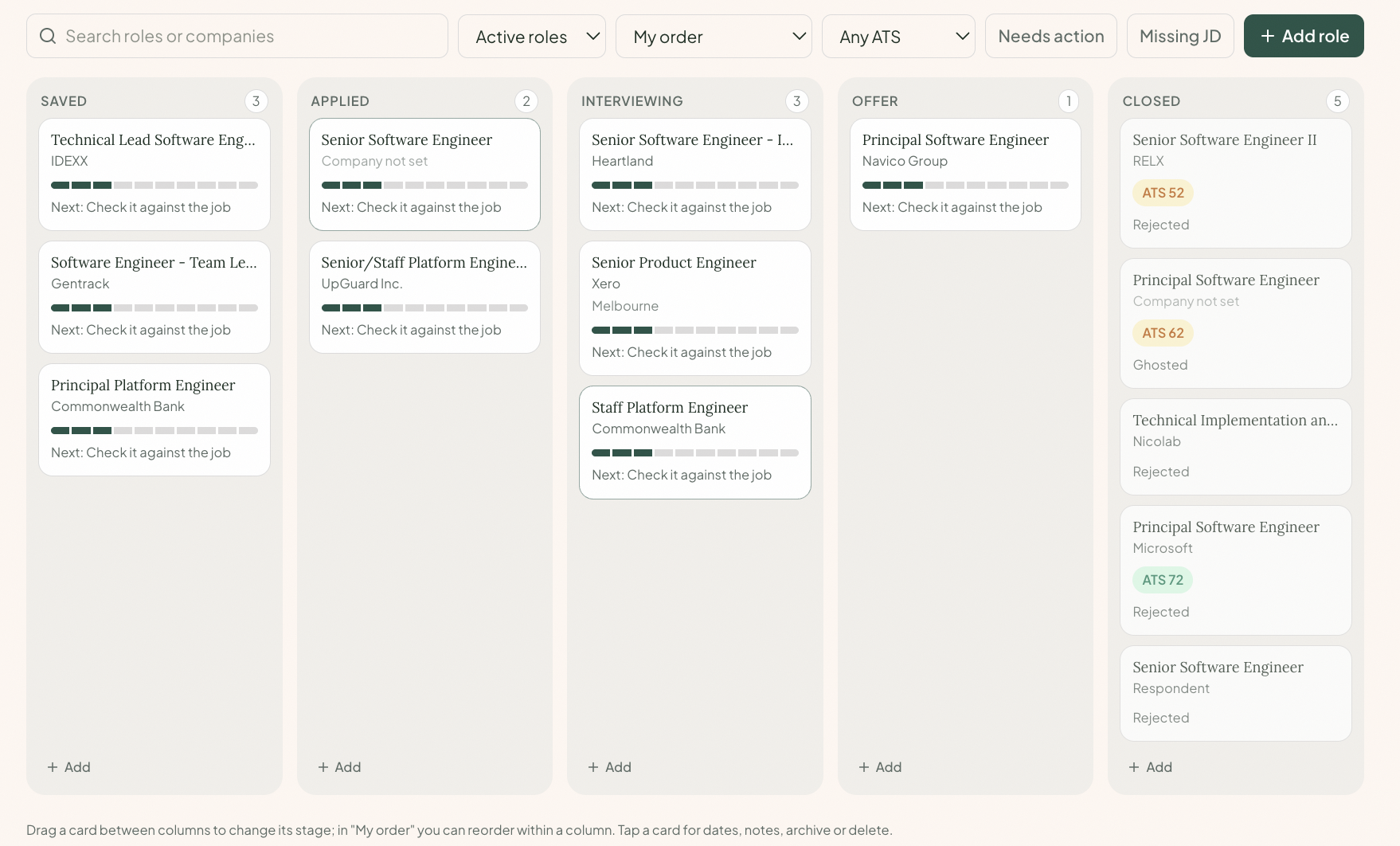
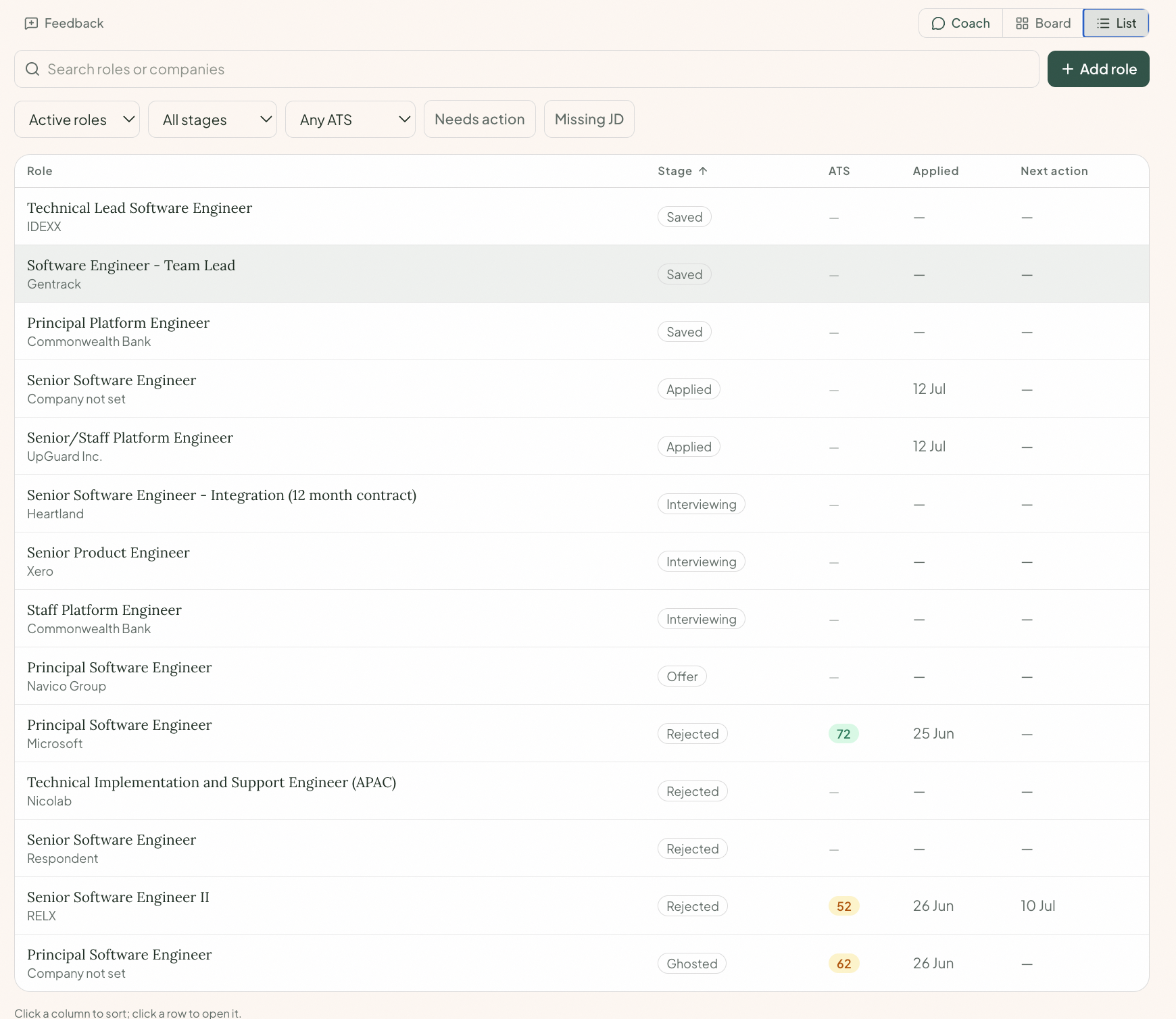
See the same pipeline whichever way fits the moment: a board you drag from Saved to Offer, a sortable list once you are past fifty roles, or a coach conversation. Filter and search across all three: by stage, by fit score, by what needs action, by what is still missing a job description.

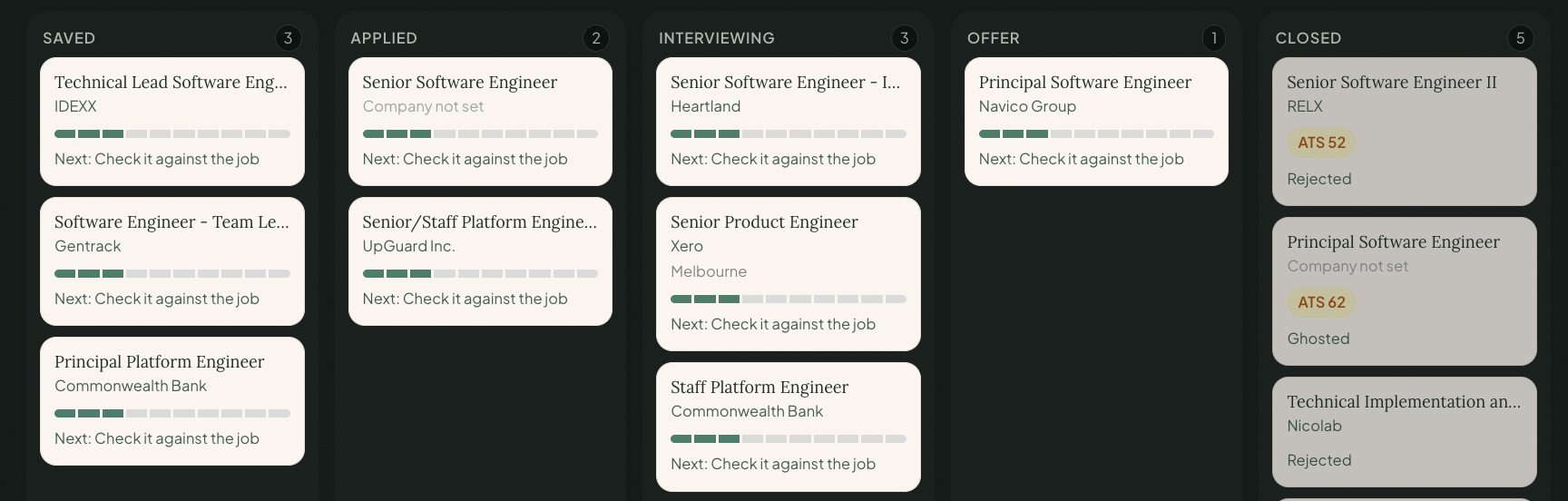
The board view: every role in columns from Saved to Closed, moved between stages
The recruiter’s stages

Stages a recruiter would recognise.

Not a generic to-do list. The stages a search actually moves through, including the ones inside Interviewing: recruiter screen, technical, final. When a role ends, it doesn’t vanish. It moves to Closed with the real outcome kept on the card, so the pattern stays visible and the coach can read it.

The board columns a recruiter would recognise: Saved, Applied, Interviewing, Offer, and Closed with the real outcome kept on each card
Open a role

Open a role, and the whole story is right there.

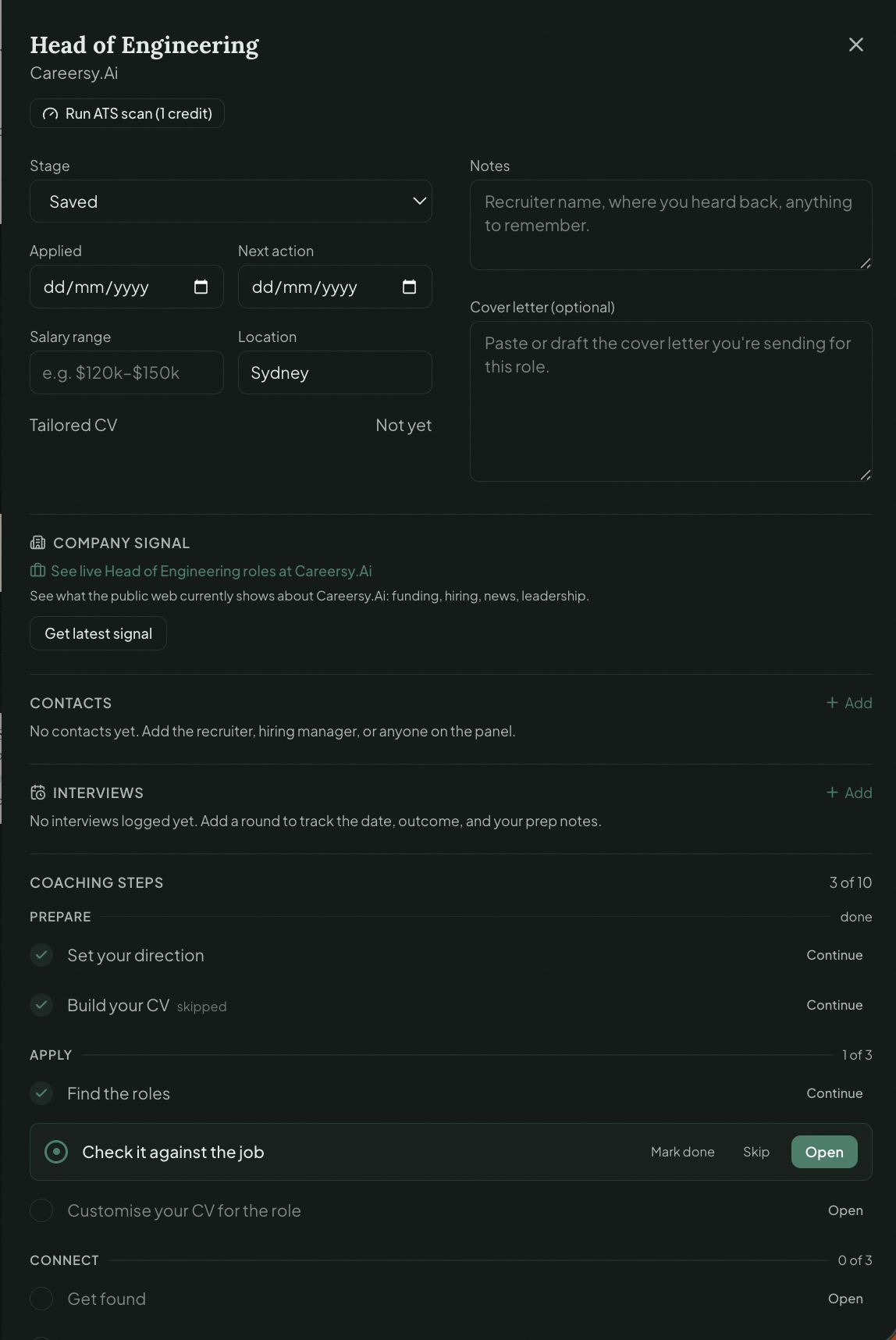
One role has a dozen moving parts: the stage, the date you applied, your next move, the recruiter you’re talking to, the fit score and when you ran it, the CV you applied with, the cover letter, and every coaching step for that role. Open the card and it’s all in one place, instead of five tabs and a memory of where you left off.

The role drawer: stage, applied date, next action, salary and location, notes, cover letter, company signal, contacts and interviews, all in one place
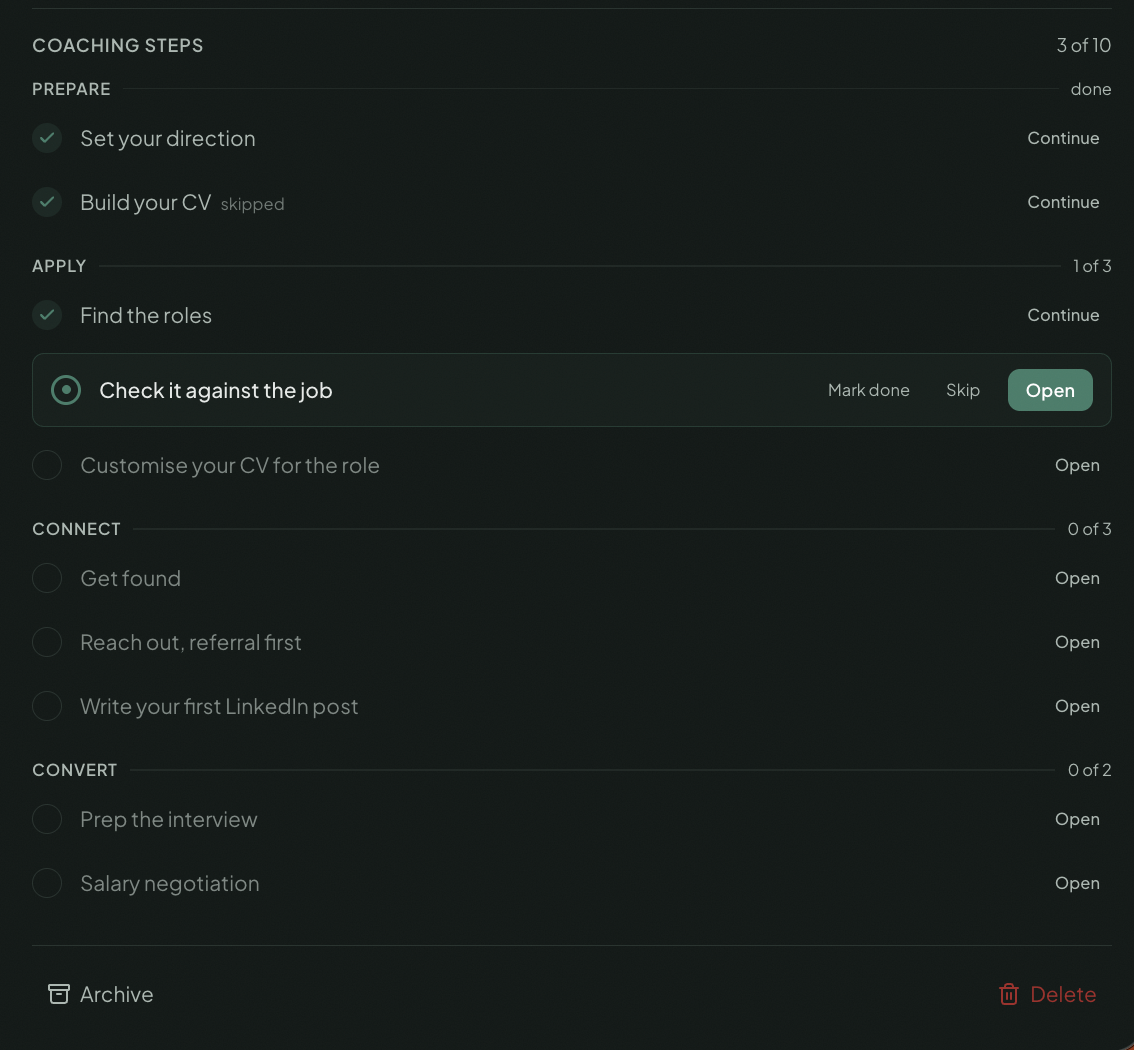
The coaching steps for the role: Prepare, Apply, Connect and Convert, each phase tracked with its own progress
Milestones

A long search needs proof you’re moving.

A real search is a marathon, and most people run it alone and in silence, with no sense they are getting anywhere. Guided Job Hunt marks every real step, from your first saved role to a cleared ATS scan to an offer on the table, so progress is something you can see, not just hope for.

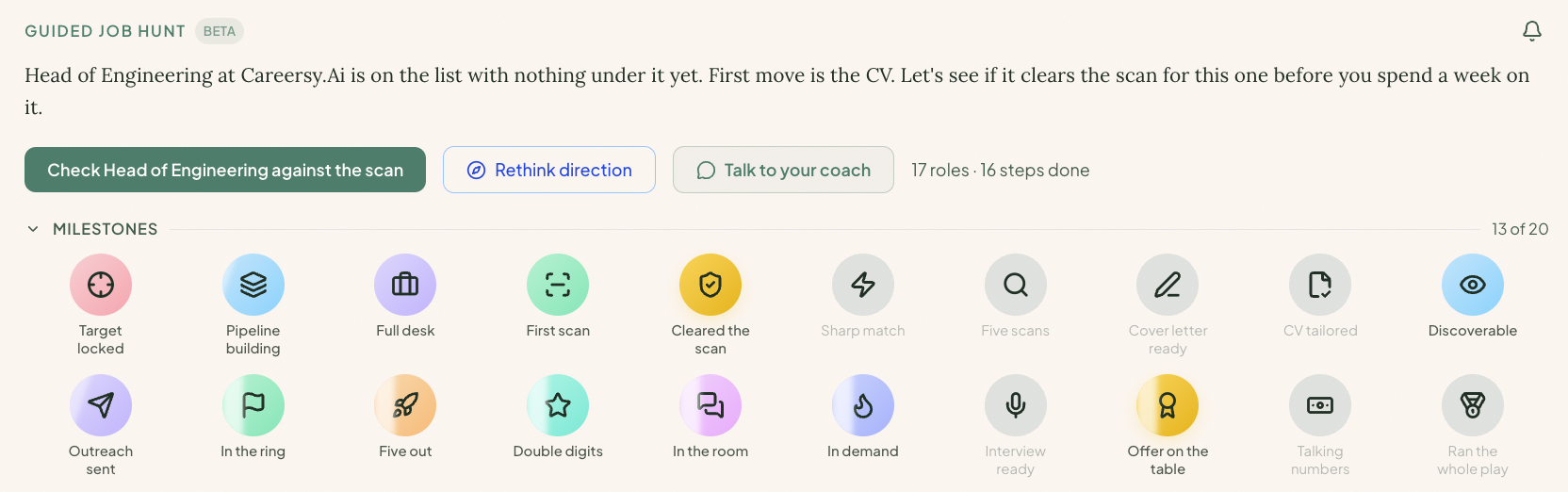
The milestones shelf: twenty badges across the search, from Target locked to Ran the whole play, earned from real activity

Twenty milestones across the search, each marked from your real activity, never a vanity metric. From your first saved role to running the whole play, end to end.

The coaching behind it

We know how a search gets won, because we’ve run the pipeline from the other side of the table.

A good recruiter doesn’t tell you to send more applications. They run a process: target the right roles, sharpen the pitch, work the stages, read where it stalls, and fix that. Guided Job Hunt is that process, the one Eli runs with coaching clients, turned into something you can run yourself, on every role, for the length of your search.

Eli Gunduz

The method is built by Eli Gunduz, founder of Careersy Coaching: 13 years inside ANZ tech recruitment, 5,000+ interview hours, 300+ professionals coached.

Why we built it this way

The default job hunt is applying into the void. Mass-send a generic CV, track nothing, learn nothing, and wonder why the callbacks never come. The market is full of tools that help you do more of that, faster.

A search you can’t see is a search you can’t fix. So we built the pipeline to make the whole thing visible: what you’ve sent, where each role sits, and where it’s stuck. Structure here isn’t bureaucracy, it’s mercy. A search you can see ends sooner and costs you less of yourself.

We would rather tell you the hard thing, that your CV is the problem and not your effort, than cheer you through another month of applying at the wrong thing.

Questions

Straight answers.

How is this different from a job tracker spreadsheet?

A spreadsheet stores what happened. Guided Job Hunt reads what it means. It keeps every role in one pipeline, and because it can see the whole search, it tells you the next move and where you are getting stuck. A spreadsheet has never once told you your CV is the problem.

Does it apply to jobs for me?

No. It helps you run the search: gather roles, read your fit, work each one through the stages, and know what to do next. You apply. The point is to make every application count, not to fire more of them into the void.

How is this different from ChatGPT?

Ask a general AI about your job hunt and it gives you generic advice with no memory of your search. Guided Job Hunt knows your actual pipeline: every role, every stage, what you have sent and what you are waiting on. So the next move it gives you is grounded in your real situation, the way a recruiter who knows your case would answer.

Who can see my job hunt?

Only you. Every role, note, and contact you add stays locked to your account. It is never visible to your current or past employers, never shown to other users, and never sold.

Does it work for the Australian and New Zealand job market?

Yes, that is what it is built for. The method comes from years on the hiring side of ANZ tech, not a US product with Australia pasted on.

Stop applying into the void.

See your whole search in one pipeline, and the next move that actually matters. It’s in your Careersy account.