To be active on LinkedIn, share things that really happened at your work. Start with comments. Write two sentences under a post in your field, with one detail from your own job. Then share articles with your own take. Post once a month to begin. AI can help you write, but the story has to be yours.
Let me tell you about a client who didn't want to do any of this. He'd been made redundant and was out of work for most of a year. He'd never written a post, and putting himself out there was the last thing he wanted to do. When he finally wrote one, it was about exactly that. It got a few dozen reactions. A hiring manager at one of the big banks saw it, clicked through to his profile, and messaged him about a role in his team. There was no ad and no recruiter. Three interviews later, he had an offer.
I can't promise that happens to you, because nobody can predict who'll see a post. But look at the order it happened in. The post got the hiring manager to click. The profile is what made the hiring manager send the message. And the post only worked because it was his story, in his words.
I've spent 13 years on the hiring side, and I see the same thing again and again. When a recruiter or a hiring manager clicks on someone's name, they read the headline and keep scrolling. From what I've seen, they're looking for activity: what you've posted, what you've commented on, and how you talk to people. On most profiles there's nothing there, or a reshare from last year. That's a missed chance. A comment thread where you're arguing with strangers is worse.
Below is the whole method in seven steps. It starts with comments you write by hand. It ends with the exact prompts to run in Careersy AI, if you want help with the writing.
What AI slop on LinkedIn is, and the one test that catches it
A post is slop when someone who wasn't there could have written it. There's no moment in it, no number, no decision, and nothing only the writer knows. The reader hunts for a point, and there isn't one. Em dashes and emojis are only the symptoms.
On LinkedIn, slop has a look. You've scrolled past hundreds of these:
- It opens with a big line about the industry, like "AI is changing everything", then "Here's what I learned:".
- The lesson is one anyone could have learned: "communication is key", "never stop learning".
- It takes a "hot take" that almost everyone already agrees with.
- It tells a neat story about someone who probably doesn't exist, like the intern who taught the CEO a lesson.
- It's "humbled to announce" something, in a way that's really a brag.
- It ends with "Agree?", "Thoughts?" or "Comment YES and I'll send you the guide".
- The comments underneath say "Great insights, thanks for sharing", or repeat the post back to its author in neater words.
My client wrote his post with AI, and that was fine. It worked because every line was his: his redundancy, his discomfort, his words.
LinkedIn draws the same line. On 20 May 2026 it said: "It's ok to use AI to help you write, but your posts and comments need to represent your voice and your perspectives." In the same announcement, it named the posts that lose out. A post that "appears to be generated by AI and lacks clear perspective" is "less likely to be widely distributed beyond a person's immediate network" (LinkedIn, May 2026). Readers can also flag a post or comment as "Seems like AI slop" from its More menu (LinkedIn Help, checked September 2026).
Think of AI as a barrister. It argues a case well, but only from a brief. Hand it your story: what happened, what was hard, what you'd do differently. Then it helps you say it clearly. Hand it only a topic, like "write me a post about leadership", and it reaches for the same words it gives everyone else. That's slop, whoever's name is on it. There's more on what to give AI before it writes in how to use AI in your job search without faking it.
So here's the one test. I call it the wasn't-there test. Run it on every post and every comment, written with AI or without:
"Could someone who wasn't there have written this?"
If yes, go back and add the thing only you know. Usually that's when it happened, or the call you made. Or it's a detail only someone in the room would know, like the tool that broke or the person who pushed back.
The objections that stop people posting
These are the ones I hear on almost every coaching call, and what I say back.
"I'm an introvert. I don't like putting myself out there."
Writing suits introverts. You do it alone, in your own time, and you choose every word. Nobody's waiting for you to answer across a table.
Start with comments (step 3). Nobody expects a comment to be polished, and warming up to someone through their posts asks nothing of them.
The fear is also bigger than the audience. In 2000, psychologists at Cornell had students wear an embarrassing T-shirt into a room full of other students. Afterwards, each student guessed how many people had noticed it. They guessed about twice as many as really had (Gilovich, Medvec and Savitsky, 2000). It's called the spotlight effect. Your first post is one post in a long scroll, somewhere between a work anniversary and someone's dog.
And remember the client at the top of this page. He hated putting himself out there. That was the post.
"My employer will see it."
They might, and that's usually fine. In five years of clients posting about their work, I've had zero problems come back. I've had the opposite. One client's CTO saw their posts and asked, "Why don't you tell us that you do this kind of work outside of work?" When you post about good work you did, your company's name sits right under yours.
Here's how LinkedIn's settings work (checked September 2026):
- Each post goes to the audience you pick when you post it: Anyone, or Connections only (LinkedIn Help). If your manager is a connection, they're in that audience either way.
- Profile edits are separate. Before you rebuild your profile, open Settings, then Visibility, and switch off Share profile updates. That stops your network being told about every change (LinkedIn Help).
- Open to Work, set to recruiters only, is its own switch. LinkedIn says it takes steps to hide it from recruiters at your current company, but it "can't guarantee complete privacy" (LinkedIn Help). Posting about your craft doesn't tell anyone you're looking.
Four rules keep it safe:
- Post nothing your company hasn't announced. That means no client names, no internal numbers, and no colleague's name unless they've said yes.
- Read your company's social media policy once. Australia's Fair Work Ombudsman tells employers to set one out (Fair Work Ombudsman, checked September 2026). If you haven't seen yours, ask HR for it.
- Add one line to the bottom of your About section: "My posts and comments are my own views." I have a line like that on mine.
- Write nothing you'd mind your manager reading. Assume they will.
"People will think I'm desperate."
From 13 years on the hiring side, what reads as desperate is how someone talks about their search. It's the post that opens with "I've sent 180 applications and nobody replies", or the message that pleads. A post about a problem you solved reads as someone who knows their job.
If you've just been made redundant and want your network to know, one post works: the what-next post. Say what you built, what you're proud of, and what you want next. Then ask plainly: "If you know a team that needs this, a share would mean a lot." Post it once, then go back to writing about your craft.
"It'll look AI-written, or cringe."
Most of this lives in your own head. When I read someone's post, what goes through my head is: is this interesting, and would I like to talk to this person? That's the whole reaction. To take the cringe out, run the wasn't-there test.
"I've got nothing worth saying."
The usual next line is "I'm not an expert." You don't need to be an expert. You need to have been there. Open your CV. Every line in it is something that actually happened, and every one of them is a post: what was hard about it, and what you'd do differently now.
Write for someone two or three years behind you in your field. The thing you worked out last year is exactly what they're stuck on now. The thing you think is too obvious to post usually isn't. You only find it obvious because you already know it.
Still stuck? Try one of these:
- A question people at work ask you all the time, and your answer
- Something you didn't understand three years ago that you do now
- A tool that makes your job easier, and exactly how you use it
- Something most people in your field get wrong, and how you know
- A conversation with a colleague that changed how you work
"It feels like showing off."
Then write about how you got there. "I got promoted" is about you. "Here's the call I got wrong in my first month as a lead, and what I do now" is useful to the reader. It also shows a hiring manager how you think.
Keeping your work private feels humble. But a hiring manager can't hire someone whose work they've never seen.
"I don't have time."
Ten minutes a day for comments, or one hour a week. That's the whole commitment. Put it in your calendar as a repeating block, same day, same time. The clients who leave it to mood do it twice and stop.
"I posted once and got four likes."
Likes are the least useful number on LinkedIn. How many people see a post depends on things you don't control, so four likes usually isn't a verdict on the writing. My client's post got a few dozen reactions, and one of those readers was the right person. What I watch on my own posts is saves and sends, because it means someone wanted to keep it or pass it on.
Is being active on LinkedIn worth it? What the numbers say
Yes. The people who hire you are already there, and most of them only read. Here are the numbers that hold up, all checked in September 2026.
- The people you want are already there. Australia has around 16 million workers and tertiary students. In 2024, LinkedIn's country manager for Australia and New Zealand said "15 million of those 16 million people are on LinkedIn" (Forbes Australia, September 2024).
- Most of them only read. LinkedIn's own engineers say "a significant portion of our weekly active users are passive consumers" (LinkedIn Engineering, 2024). From what I've seen over the years, most profiles haven't posted anything in months. Showing up at all puts you ahead.
- The feed rewards reading time and replies. In February 2026, LinkedIn's engineers published a paper on how the feed is ranked. The system learns from two things: whether people stop to read a post, and whether they like, comment on or share it (arXiv, 2026). A real story gives people something to stop for.
Two numbers you'll see quoted don't hold up. "Posting weekly gets you 4x more profile views" traces back to members' posts, with no LinkedIn data behind it. "LinkedIn cuts the reach of AI posts by 30%" has no published method behind it. LinkedIn's own Help page says its focus "is not on how content is created" (LinkedIn Help, checked September 2026). What LinkedIn has actually said about AI is in the slop section above.
Step 1. Check your profile first, because every post sends people there
A post gets the click. Your profile decides whether they message you. So before you post anything, check two things:
- Your headline carries two or three job titles recruiters actually search for. They don't have to match your payslip.
- The first two lines of your About say what you do and at what level. That's all that shows before "see more".
Your profile is what gets you found in a recruiter's search. Why your LinkedIn profile is invisible to AI recruiter searches shows how to fix it. Posting is what people read once they've clicked. To see which titles recruiters type, read how recruiters search for candidates.
Then open your profile, find the Analytics section, and write down your profile views number. You'll compare against it in a week.
Step 2. Pick two pillars, and prove each one with three stories
A pillar is a topic you'll keep coming back to. Pick your pillars before you decide how often to post, because "post every week" feels impossible until you know what the posts are about.
- Pillar one is the work you do, the way someone would search for it, like "data engineering on streaming pipelines" or "payments operations". Keep it narrow enough that the people searching for it are the people you want to hear from. Make it match your headline, so the post and the profile say the same thing when someone clicks through.
- Pillar two is what's changing in that work. For most people right now, that's what AI is doing to their job. It's the one I push most clients towards, because you're living through it at work and interviewers keep asking about it.
- Now test them. Under each pillar, write three things that actually happened to you at work in the last year: a problem you fixed, a call you made, a mistake you learned from. One line each. If you can list three in ten minutes, that's your pillar. If you stall after one, make the pillar narrower and try again.
That's six stories, which is your first six posts. There's a table for them further down.
Step 3. Comment by hand, before you ever post
If you're nervous, start here, and do it without AI. A comment puts your name and headline in front of everyone reading that thread, and nobody expects a comment to be polished.
First, choose who. Make a list of 20 to 30 people and follow them. Take them from two places:
- people at the companies you'd like to work for (the target list in how to get a referral for a senior tech job is a good place to start)
- people in your field at your level or one above
Their posts are about the actual work, and that's where a detail from your own work fits. To find more, type your pillar into the LinkedIn search bar and filter to Posts.
Aim most of your comments at these people. On a hiring manager's post with twelve comments, the author reads yours. On a famous creator's post with two thousand, yours gets buried. While you're at it, unfollow anyone whose posts don't teach you anything. Your feed then fills up with your own field.
Each comment is two sentences. Replying to someone else's comment counts too.
- One detail from your own work: a tool you used, a number, something that went wrong.
- What you'd do differently, or one real question for the author.
Here's a comment that tells the author nothing about you:
"Great insights, thanks for sharing."
And here's one that shows you've done the work. The brackets are where your own details go:
"We hit the same wall moving our batch jobs to [tool]. [The part] was what broke first. Did you rebuild it from scratch or patch the old one?"
If you can't add a detail from your own work, skip that post and find another. Write three a week to start. Once it's a habit, write one a day. Each takes a few minutes.
Leave AI out of this one. An AI comment reads the post and hands it back to the author in neater words. The author can tell, and so can everyone reading the thread. A comment is only worth leaving if something from your work is in it, and AI doesn't have your work.
And one warning: don't argue. Over the years I've watched a hiring manager kill an offer that was about to go out. The candidate was a strong engineer. Then the hiring manager read their comment history, and it was thread after thread of "you're wrong, I'm right". Their references were lukewarm too, and together it was enough. If you disagree, do it once, politely, with your own example. Then move on.
Step 4. Share what you read, and add your own take
This is the next step up, and it's still by hand. A reshare with nothing added tells a hiring manager nothing about you. A share with your take tells them how you think.
- Go to Substack, Medium or a company engineering blog. Search your role plus AI, like "product manager AI" or "data engineering AI".
- Read one piece all the way through. Only share it if it changes something you'll do.
- Write three lines above the link. First, who wrote it and what it's about. Second, the one thing that stood out, tied to your own work. Third, what you'll try because of it, or where you disagree and why.
Something like this, with your own details in the brackets:
"Read [author]'s piece on [topic]. The bit that stuck with me: [their point]. We do the opposite on my team, [one line on what you do]. I'm going to try [their idea] on our next [project]."
If you can't write the third line, it isn't your share to make. Do this in the weeks you don't post.
Step 5. Write your first post by hand
This takes about twenty minutes.
- Pick one of your six stories. Can't choose? Open your CV, look at your last two roles, and pick the line you'd most like to be asked about in an interview.
- Answer these out loud, with your phone recording or voice typing on. What was the situation? What was the hardest part? What did you decide, and what would you do differently now? Talk for two or three minutes. Your answers are the post.
- Write the first line last. Say when it happened and what was at stake, like "Two weeks before go-live, our only database admin resigned." Most people only see the first two or three lines before "see more", so those lines decide whether anyone reads the rest.
- Keep it to one point. If a second lesson turns up, that's next week's post.
- Break it into short paragraphs, one or two sentences each, with a blank line between them. Plenty of people read LinkedIn on their phone, and a solid block gets scrolled past. My client's first post nearly went out as one block.
- Aim for 1,000 characters or more, roughly 170 words. A real story needs that much room.
- Stop when the story stops. Don't restate the lesson at the end, and skip "Agree?" and hashtags. If you ask a question, make it one only someone in your field could answer.
- Read it out loud. Change every line you wouldn't say to a colleague.
The shape that works is simple. The first two lines say when it happened and what was at stake. The rest says what made it hard, the call you made, and what you'd do differently.
If you want a starting point, these shapes work:
- The call I made: the situation, the options, what you picked and why.
- The thing I got wrong: what happened, what it cost, what you do now.
- The before and after: the number before, the one change you made, the number after.
- What I learned building it: a personal project, said plainly as a personal project.
- The what-next post, if you've just finished a role (see the objections above).
Step 6. Or build it with Careersy AI
Two tools in Careersy AI do this, and neither posts for you. You copy the finished post into LinkedIn yourself. Here's the whole thing, start to finish, on a made-up CV. It takes under two minutes to watch.
Start by finding the idea. Open Careersy AI and choose Create LinkedIn Post. Attach your CV with the + button and pick CV/Resume. If your CV is already saved to your profile, you can skip this, unless you're in a Temporary Chat. A Temporary Chat doesn't use anything saved, so attach your CV there too. Then paste this in:
Prompt
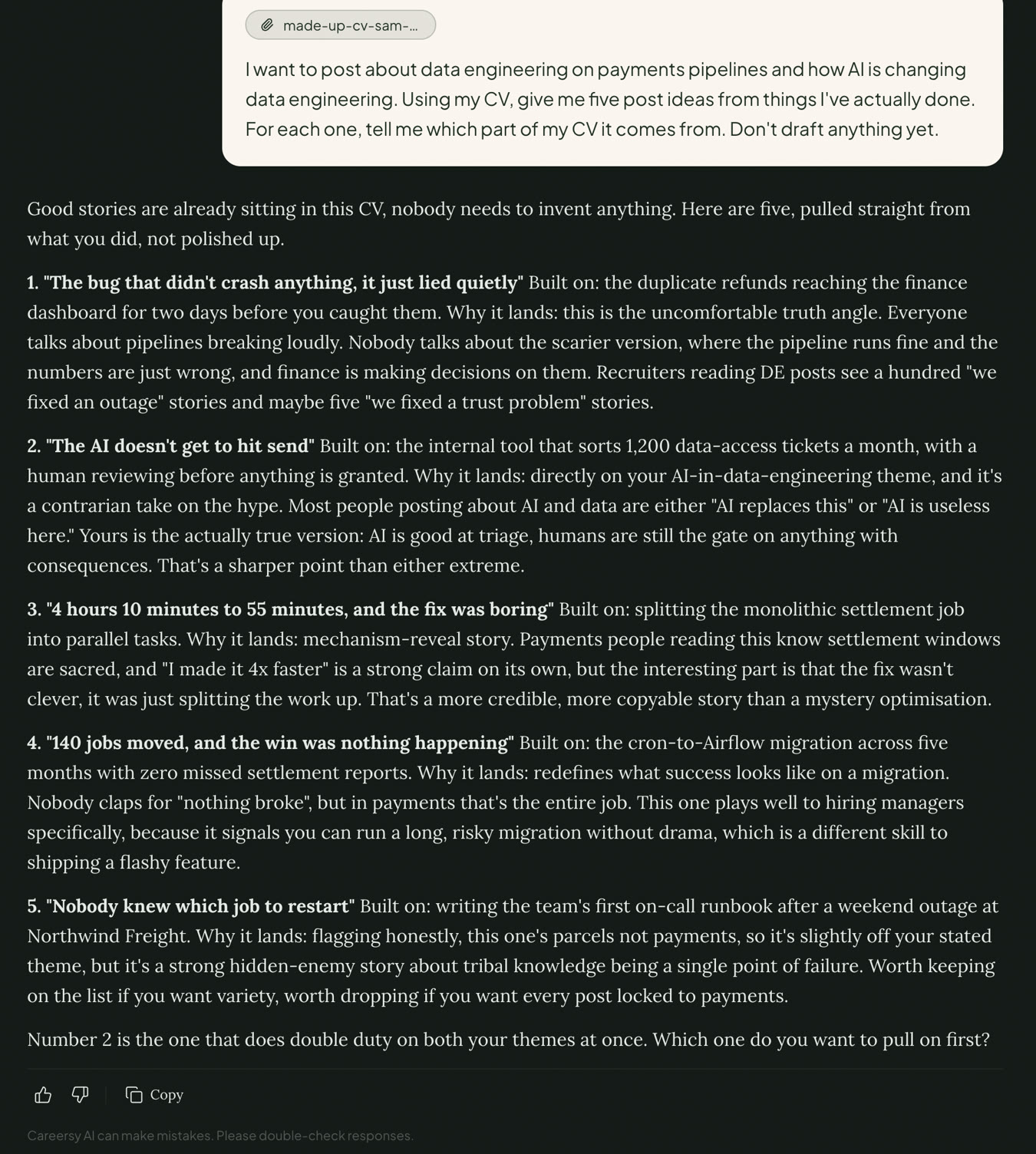
I want to post about [pillar one] and [pillar two]. Using my CV, give me five post ideas from things I've actually done. For each one, tell me which part of my CV it comes from. Don't draft anything yet.
Here's what came back in our test, on a made-up CV for a senior data engineer:
Next, let it interview you. Pick one idea and send this:
Prompt
Help me write a post about [the idea you picked]. First, ask me one or two questions to get the real insight or lesson out of me: what made it hard, the call I made, what I'd do differently. Then draft it from my answers and my CV only.
Anything you don't know, leave as [?]. Don't invent numbers.
It asks before it writes a word:
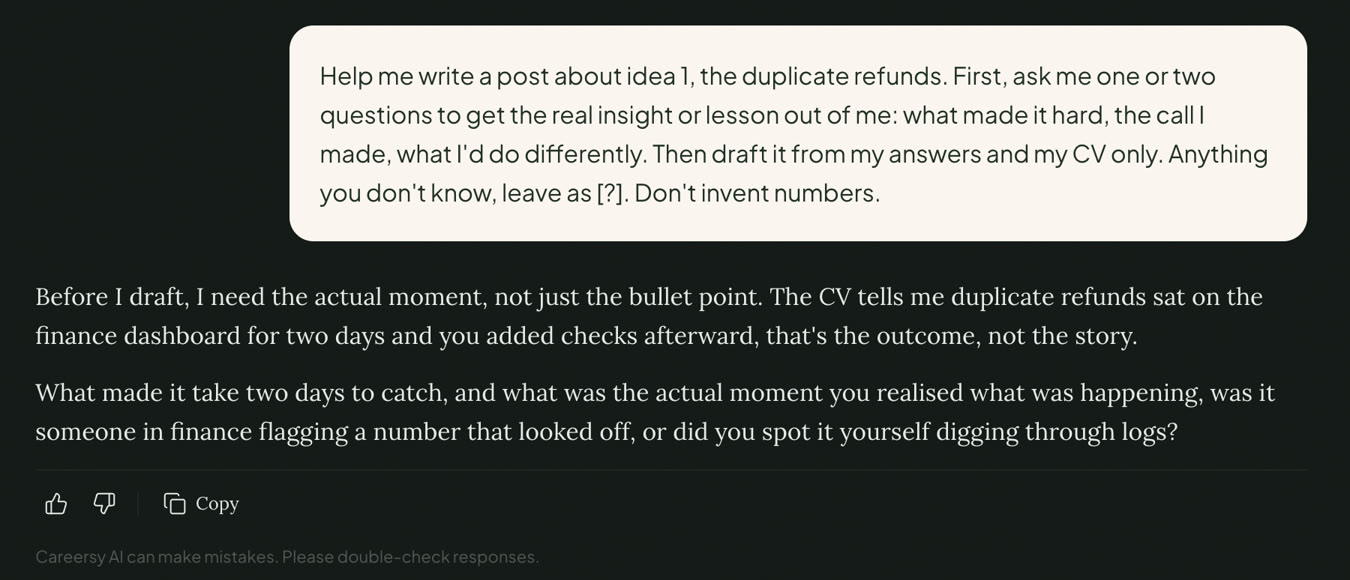
Tap the microphone and talk your answers through, because you'll give it far more detail speaking than typing. Then it drafts the post in the chat. If a detail needs checking, it tells you. In our test it asked whether "two days" was right.
Now pressure-test the draft before you touch the wording. Paste it back in with this:
Prompt
Here's my draft: [paste it]
Grade it like an honest peer editor: the first line, whether it sounds like me, how specific it is, and whether the ending pays off. Score each out of ten. Quote the lines that sound like AI or could have been written by anyone, poke holes in my argument, and tell me what's missing that only I could add. Don't rewrite it yet.
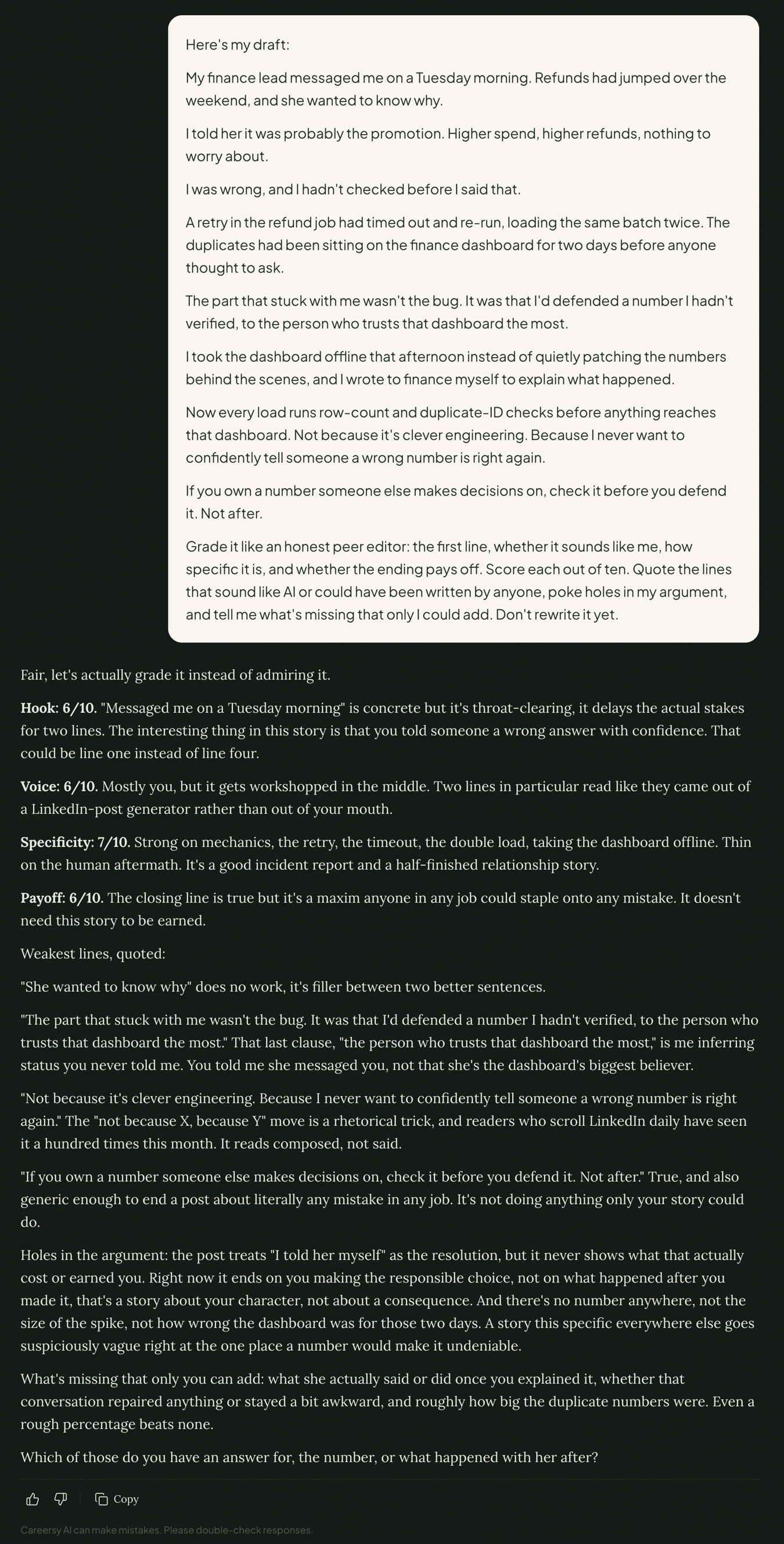
Don't skip this one. In our test it quoted a line built as "not because of this, because of that", a contrast shape that reads as AI. It called the last line a saying anyone could staple onto any mistake. And it caught a detail it had made up itself. Answer what it asks, or fix those lines by hand.
When the words are right, send this:
Prompt
Lay out the draft as a post so I can finish it in the canvas.
You get a post card with two versions to choose from, and it tells you how many characters the post runs to. The name and the reaction counts in the preview are placeholders.
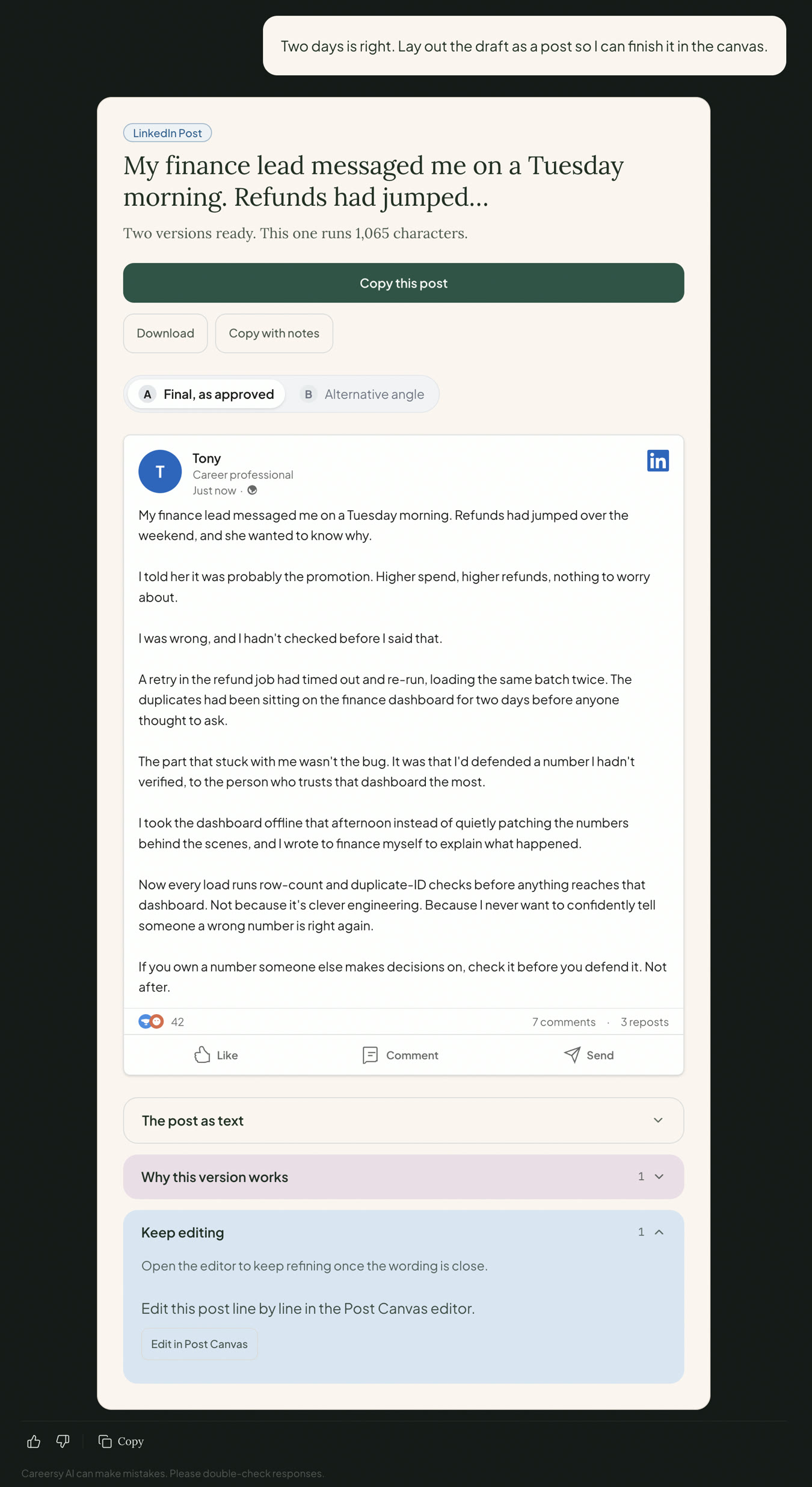
Then finish it in the LinkedIn Post Canvas. Under the post card, click Edit in Post Canvas. The canvas shows your post the way LinkedIn will.
Start with any line that sounds off. Highlight it, then type what's wrong in the box above the chips. This is the instruction that worked in our test. Swap the middle part for whatever's wrong with your line, then paste this in:
Prompt
Say this in one plain sentence, the way I'd say it to a colleague. [What's wrong, like: No "not because, because" contrast.] Keep my meaning.
Click Rewrite this passage. Read the new version, then click Accept or Discard. The chips under the box, like Cut the AI-isms, are a quick start. Check what comes back. If the sentence still has the same shape, type your own instruction.
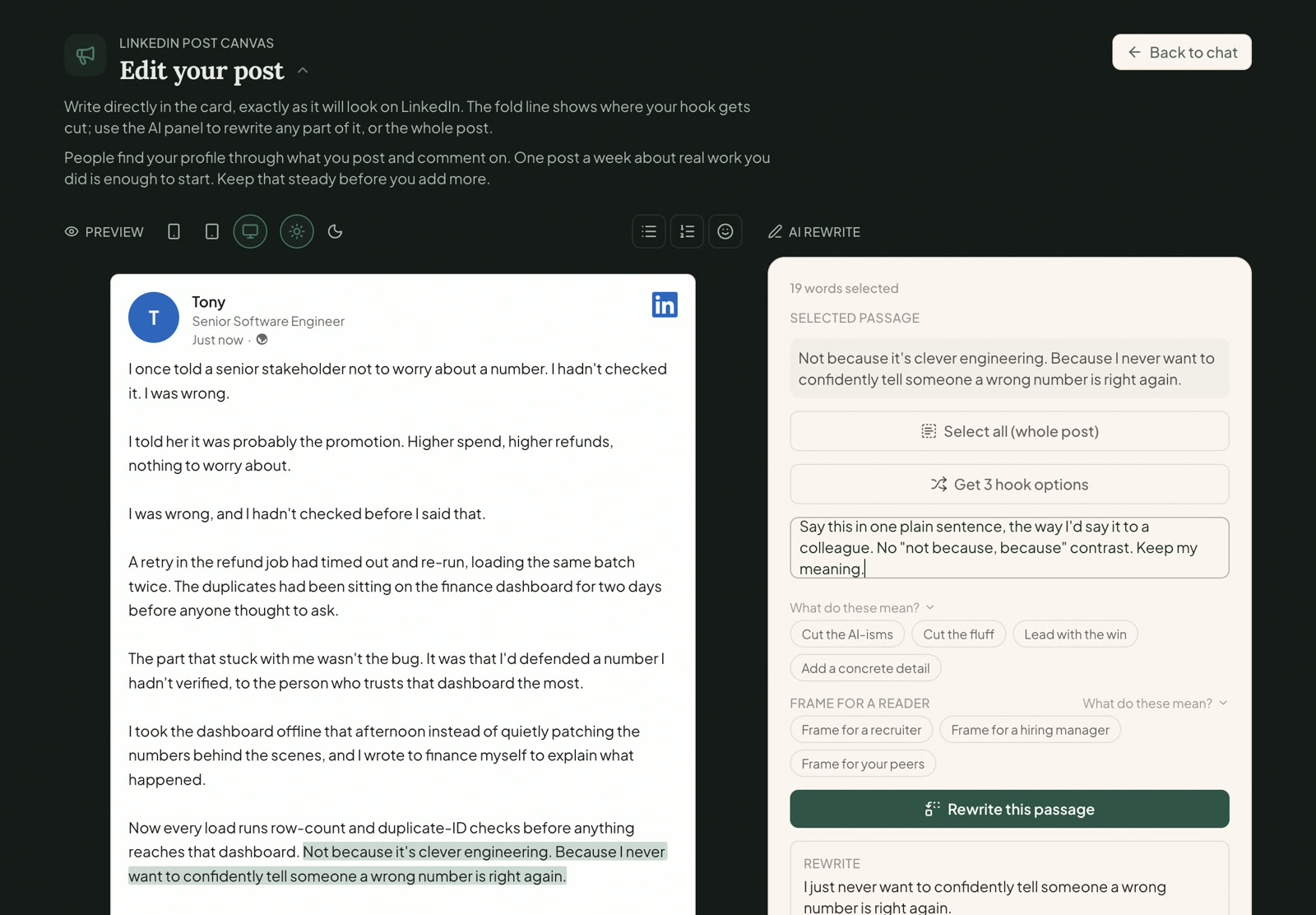
Then three more things, in this order:
- For a stronger first line, click Get 3 hook options and tap the one that sounds like you. Then read the whole post again, because the new opening can repeat a line further down. Ours did.
- For a lesson tacked on at the end, select it and press delete. You don't need AI for that.
- When it's done, click Copy post, open LinkedIn, and paste it in.
A rewrite uses one credit, and so does each set of three hook options. If the AI needs a detail from you before it can rewrite, it asks, and you aren't charged. The chat shows its own cost at the top before you start. You can also open the canvas straight from the Toolkit, where it's called LI Post Canvas.
Before you post, run the grading prompt in "How you know it's working" on your final version. In our test it caught that a swapped-in first line had made the post vaguer and repeated itself. AI edits can strip the detail out of a post as easily as fix a line.
Not using Careersy AI? The same prompts work in your own AI tool. Or do it by hand with step 5.
Step 7. After you post
- Reply to every comment within the day. The conversation is where people get to know you. You'll often read that the first hour decides how far a post goes. We couldn't find LinkedIn saying that anywhere (checked September 2026).
- Don't delete a post because it got few reactions. One reader can be the right one.
- Put the next one in your calendar, same day, same time. Once a month is enough to start. Once a week is plenty once it's a habit. I see this one a lot: someone posts, lands a job, then stops, and next time they're starting from zero.
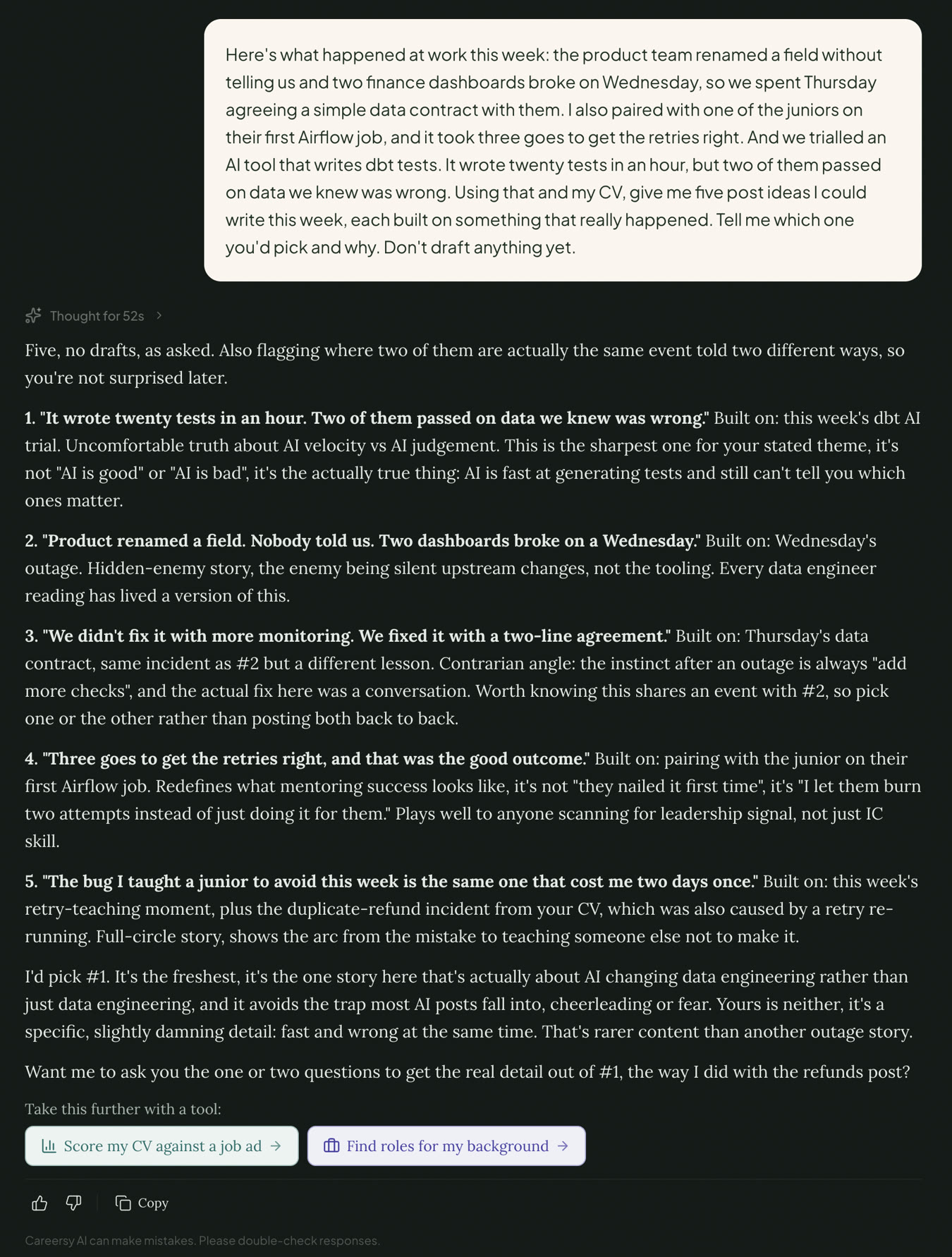
To keep the ideas coming, make this a weekly habit. Open Create LinkedIn Post, tap the microphone, and send this:
Prompt
Here's what happened at work this week: [talk it through for two minutes]. Using that and my CV, give me five post ideas I could write this week, each built on something that really happened. Tell me which one you'd pick and why. Don't draft anything yet.
What not to post on LinkedIn
- Bitterness about a past employer, a recruiter who ghosted you, or the market. From what I've seen, negativity in someone's recent activity reads as a culture risk. You'd never be told that's why the callback didn't come. Say it to a friend instead.
- Arguments. Remember the offer that never went out, in step 3.
- Politics and hot-button topics. Stay on your craft.
- Anything your company hasn't announced, like client names, internal numbers, or a colleague's name without their yes.
- The "180 applications" post. Write the what-next post instead.
- Fishing, like "Comment YES and I'll send it", "Agree?", or tagging twenty people.
- AI comments. See step 3.
Your posting plan
Copy this into a spreadsheet or doc. Fill in three rows for pillar one, then add three more for pillar two.
| Pillar | The story, in one line | What made it hard | The call you made, or what you'd do differently | Posted on |
|---|
| 1 | | | | |
| 1 | | | | |
| 1 | | | | |
Keep your list of 20 to 30 people to comment on in the same doc.
How you know it's working
Two checks tell you, and you can run both within a week:
- A week after your first three comments, check your profile views against the number you wrote down in step 1.
- A week after your first post, open the analytics under it. Look at how many people saw it, and whether anyone saved it or sent it on. Ignore the reactions.
Then read your post against these questions:
- Is there a when: a day, a deadline, a moment?
- Is there a detail only someone who was there would know?
- Do I say what I decided, or what I'd do differently?
- Would I say every line out loud to a colleague?
- Does it stop when the story stops?
- And the wasn't-there test: could someone who wasn't there have written it? If yes, it isn't done.
Here's how posts land with the people reading them, from what I've seen. I call it the only-you ladder:
- Slop. Anyone could have written it.
- Safe. It's true, but a peer would shrug.
- Specific. It has a real moment, a tool or a number.
- Only you. It adds the call you made, what it cost, and what you'd do differently.
"Safe" is where most careful people get stuck. It's true, it's polite, and it says "communication matters". Nobody's put off by it. Nobody messages you because of it either. What moves a post up is the call you made, what it cost, and what you'd do differently. Those are the parts only you can write.
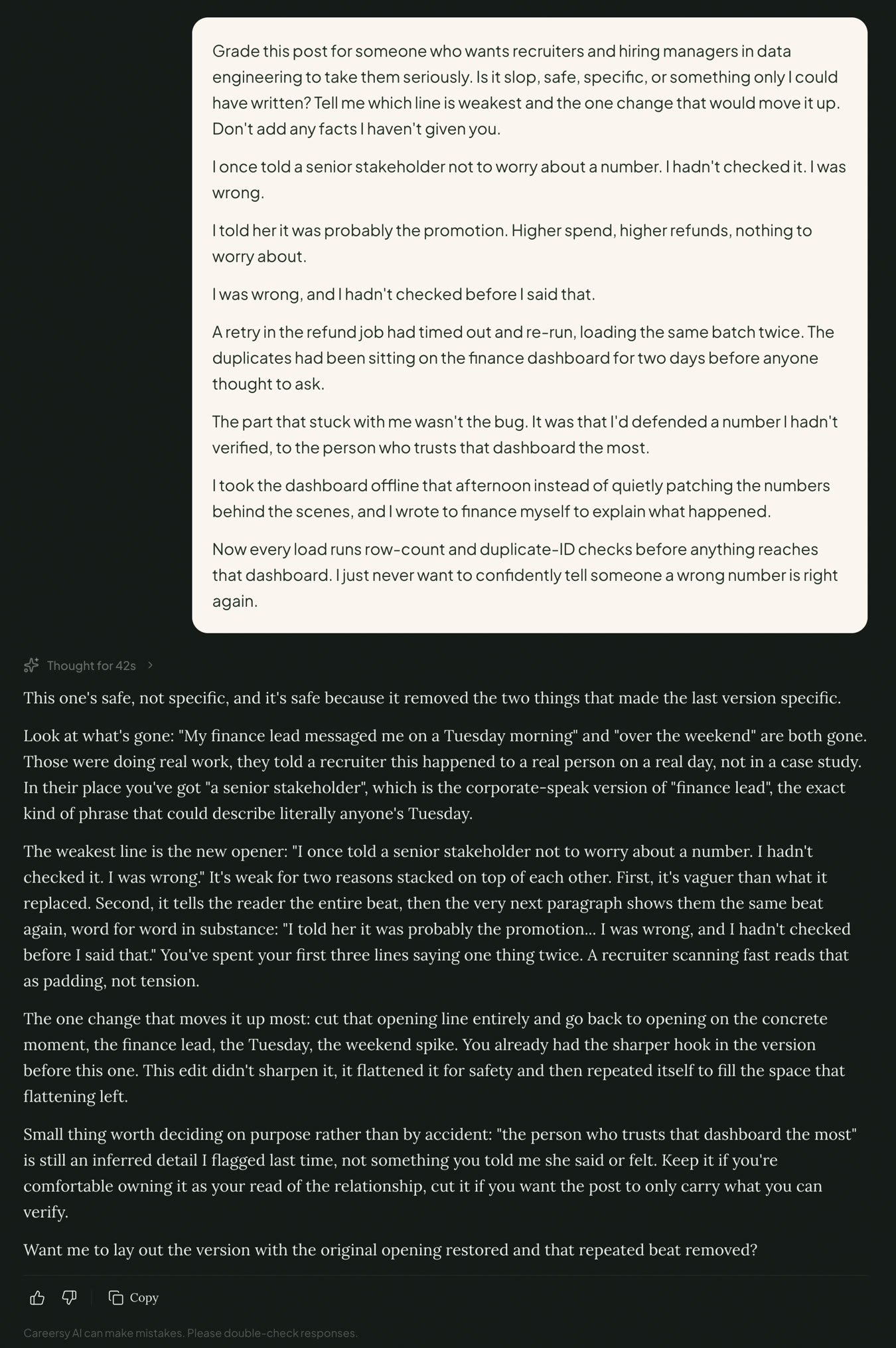
For a second opinion, paste the finished post into Create LinkedIn Post with this:
Prompt
Grade this post for someone who wants recruiters and hiring managers in [your field] to take them seriously. Is it slop, safe, specific, or something only I could have written? Tell me which line is weakest and the one change that would move it up. Don't add any facts I haven't given you.
[paste the post]
Where this doesn't work
- Your employer bans posting about work. Some banks, government teams and security-cleared roles restrict it. Read the policy first. If it rules out work stories, stick to comments and shares with your take, and keep your own posts to personal projects and what you're learning.
- You need a job in the next two weeks. Posting pays off over months. Fix your profile first, then go after referrals at companies hiring now, using the referral route linked in step 3. Keep commenting on the side.
- You want to go viral. This method is for being found and taken seriously by the people who hire in your field. Building a big creator audience is a different game, with different rules.
FAQ
How do I be active on LinkedIn without posting?
Comment. Write two sentences under posts from people in your field: one detail from your own work, then a question or what you'd do differently. Three comments a week puts your name and headline in front of everyone reading those threads. Each comment takes a few minutes.
Will my employer see my LinkedIn posts?
If your manager or colleagues are LinkedIn connections, they can see your posts, whichever audience you pick. Stick to work your company has already made public. Read your company's social media policy once. To stop your network being told about every profile edit, switch off Share profile updates in your visibility settings.
How often should I post on LinkedIn?
Once a month is enough to start, and once a week is plenty once posting is a habit. Put it in your calendar as a repeating block, same day and time. People who wait for the right mood usually stop after two posts.
Is it okay to use AI to write LinkedIn posts?
Yes, as long as the post says what really happened to you, in words you'd actually use. LinkedIn said in May 2026 that AI help is fine, but posts need to represent your own voice and perspective. Give the AI your story first, and grade the draft before you post it.
What is AI slop on LinkedIn?
AI slop on LinkedIn is a post that someone who wasn't there could have written. It has no moment, no number and no decision in it, just a lesson anyone could state. To check a post, ask whether someone who wasn't there could have written it. If they could, add the detail only you know.
What should I post on LinkedIn when I'm looking for a job?
Post about the work you've done. A problem you solved, a call you made, or what you'd do differently now shows a hiring manager how you think. What reads as desperate is a post about the search itself, like "I've sent 180 applications and nobody replies". If you've just been made redundant, write one what-next post: what you built, what you want next, and a plain ask for shares.
Do it with Careersy AI
Every prompt on this page runs in Careersy AI. Create LinkedIn Post drafts from your CV and your answers, and asks before it writes. The LinkedIn Post Canvas is where you finish the wording. Neither of them posts for you. Every account starts with 3 free messages on us, no card needed, at app.careersy.ai/signup.
If you'd rather do it by hand, that works too. Steps 3 to 5 need nothing but LinkedIn and your phone's voice recorder.