Guided Job Hunt 2.6.0: removed "Beta" tag.
That's the whole entry, if we wrote it the way software usually writes these. One line, filed
under a version number, and you'd skim past it in four seconds having learned nothing about why.
We're not doing that. This is The Debrief: a running account of what changed at Careersy AI, and
the real moment that made us change it. Not a changelog. Every entry here only earns its place if
it traces back to something that went wrong: a client I watched get hurt by the old way, or the
product caught doing something it shouldn't. No traceable failure, no entry, no matter how proud
of it the product team is.
01 · We stopped calling five years of real coaching a "Beta"
Guided Job Hunt runs your whole search like a recruiter runs a pipeline: work out what to target,
scan live roles, pull company intel, tailor your CV per role, track everything from saved to
offer. Until last week it had a grey "Beta" tag next to it on the site.
Here's what that tag actually meant. This is the exact method I've run with coaching clients for
five years, the one where we sit down, work out the real target, and move it stage by stage. We
finally built it into software, slapped an "experimental" label on it out of habit, and only
noticed months later we'd tagged five years of proof as untested. "Beta" tells you to hold back
before you've tried a single thing. That's the opposite of what this deserved. So we took the tag
off.
See Guided Job Hunt →
02 · Role Discovery, for the people who've done a bit of everything
Guided Job Hunt 2.6.0: added Role Discovery.
A client once came to me with a CV split across two lanes: half consultancy director managing
serious budgets, half someone trying to break out and do their own thing. Both true, neither
clear.
I told him straight: you're sending mixed signals, pick one lane. Neither lane was wrong. A
recruiter scanning your CV for six seconds can't hold two people in their head at once. Scattered
reads as unclear, and unclear gets skipped.
That conversation used to require me. Now Role Discovery does the first pass. It reads your
actual CV, not a personality quiz, and hands you two or three directions, each one labelled
honestly as a strong match or a stretch with the missing piece named. You pick a lane before the
search starts.
Run Role Discovery →
03 · Pick a layout for each CV section
CV Canvas: per-section layouts, plus a clean way to show a career break.
In our Careersy coaching sessions, this one comes up over and over. A client came to me sitting
on a two-year gap she had no idea how to explain, so she'd left it blank and hoped nobody would
ask. From the hiring side, blank is the worst option on the table. A recruiter can't leave a gap
empty. They fill it, and they fill it with the darkest version: burned out, managed out, a flight
risk. Hers was none of that. She'd taken a planned break to care for an ageing parent, which tells
a recruiter you stay steady under real load, and her CV gave her nowhere to say it.
Here's the part I've watched too many times from the other side of the desk. The gap almost never
sinks a strong candidate. The silence around it does.
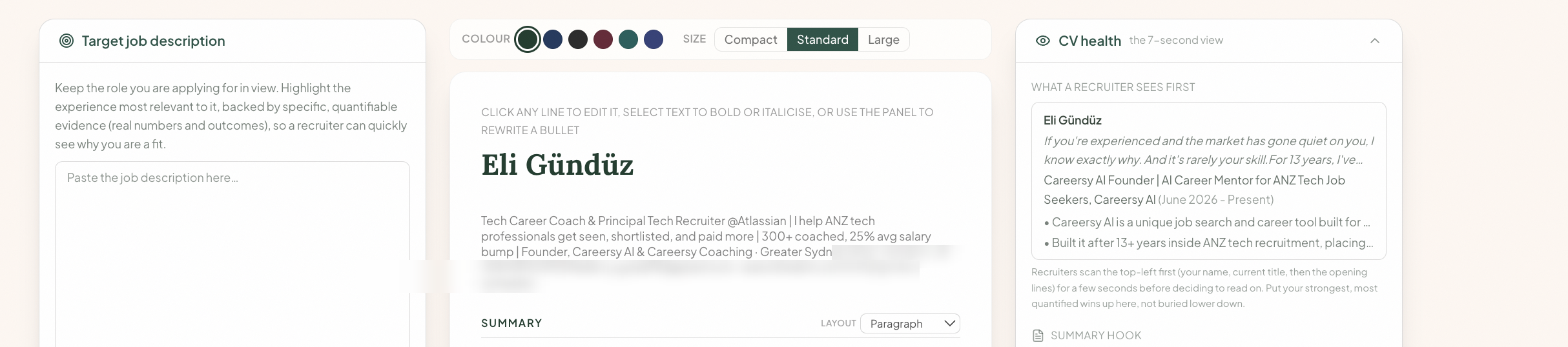
CV Canvas now lets you set the layout of each section on its own, and that includes a proper
career-break entry: its own title, its own dates, room for the one line that answers the question
before a recruiter asks it. The rest bends too. Skills can sit by category, in tiers, in three
columns, or as plain grouped bullets, whichever actually reads for you. Your summary switches
between a paragraph and bullet points. Experience comes in two labelled formats so you pick the
one that tells your roles best. Choose per section and it holds through every download, PDF and
Word. Your wording never changes. Only how it sits on the page.
Open CV Canvas →04 · LinkedIn Post Canvas, because I caught myself writing slop
LinkedIn Post Canvas: now grounded in your real CV, profile and logged wins.
This one's on me. On a Careersy coaching call, I was demoing an early drafting tool, turning a
project the client had shipped into a LinkedIn post. I typed a prompt, it spat something out, and
I read it back out loud: short punchy sentences, an impactful bullet point, the cadence you've
seen nine hundred times this month.
"This is exactly the kind of stuff I read on LinkedIn," I said. He agreed before I'd finished the
sentence, unprompted: probably ninety percent of what he scrolls past reads exactly like that.
Same rhythm, no fingerprint. The tool wasn't lying. It just wasn't grounded in anything.
LinkedIn Post Canvas only writes from what's actually yours, your CV, your profile, the wins
you've logged, and shows you the post the way your feed will see it, "see more" fold included,
before you publish a word of it. Nothing posts itself. But grounding it in your CV means you stop
having to police every draft for whether it sounds like you or like everyone else. Nobody else
sounds like that.
Two more changes since launch. If the blank page was where you always stalled, you can now open
the canvas, tap "I have an idea," and start from whatever rough thought you've actually got.
Answer a question or two and it builds the post with you. And selecting text finally behaves like
a normal text box: drag across the whole thing or hit select all. Small, but that one made
editing miserable before.
Open LinkedIn Post Canvas →
Also fixed: two bugs we caught
Not everything traces to a coaching room. Some of it traces to us watching the product do
something wrong and fixing it before more people hit it.
Web search was dropping the good pages. You'd ask Careersy about a company's interview process
and get a thinner answer than the open web actually held, because our search summariser was
stripping genuinely relevant pages before they reached you. It now pulls the specific relevant
snippets from each source first, so real detail on interview processes, company research and
industry trends makes it through. One thing to check: the web-search toggle in the composer has to
be on.
Long chats with images were erroring out. A few conversations with a couple of images
attached over time, a screenshot of a job ad, a CV export, started throwing a generic error on
every new message, even unrelated ones. That's fixed. If it happened to you, it clears the moment
you send your next message. Nothing to redo.
Why we're logging it this way
A normal changelog is written for the company: proof of velocity, aimed at people who already
trust you and just want confirmation you're still moving. That's not you.
What actually matters, even though it won't get you a callback this week: you can't watch software
get built, so you have no way to know whether the people behind it are watching what happens to
someone like you, or watching a growth chart. Most roadmaps get built from a competitor's last
release. Ours gets built inside a Careersy coaching session: a client sitting on a gap she can't
explain, me catching my own mouth saying something I wished I hadn't. The coaching is where we
watch what actually breaks for people. The product is what we build back from it. That doesn't
change how many roles are open in Sydney or Melbourne this month. It changes whether you believe
the people building this are looking at the right thing, and showing you that costs us nothing
extra.
Don't take my word for it. Open Guided Job Hunt this week and run Role Discovery on your real CV,
it takes less time than the CV summary paragraph you've been stuck rewriting. If the strong match
doesn't sound like you, that's data too. It's free to start, three credits, no card.
FAQ
What is Guided Job Hunt on Careersy AI?
The end-to-end job search inside Careersy AI: work out what to target, scan live roles, get
company intel, tailor your CV per role, and track everything from saved to offer. It's the
search process Careersy Coaching has run with clients for five years, now built into the product.
Does Role Discovery replace a career coach?
No. It pattern-matches your CV against real role directions, honestly labelled as a strong match
or a stretch. A coach still matters for what Role Discovery can't see: what you actually want, and
the judgment calls behind the CV.
Can I change how my CV looks without rewriting it?
Yes. CV Canvas now gives each section its own layout: skills by category, tiers or columns, your
summary as a paragraph or bullets, experience in two formats, plus a clean career-break entry. It
changes the layout only. Your actual wording stays exactly as you wrote it, through every PDF and
Word download.
Does LinkedIn Post Canvas post on my behalf?
No. It drafts from your real CV, profile and logged wins, and shows you a live preview before you
publish. You always hit post yourself.
Is Careersy AI free to try?
Yes. 10 free messages to start, no card required. Every mode and both canvases are included from the
first paid tier up.